PesaPulse turns your WordPress site into a billing desk. Customers pay your Paybill or Till with their account number, or tap Pay now. PesaPulse credits the right account, extends their service and pauses access when it lapses. Add Pro and they get SMS or WhatsApp reminders before it does.
WordPress plugin Safaricom Daraja (C2B + STK Push) Built in Nairobi
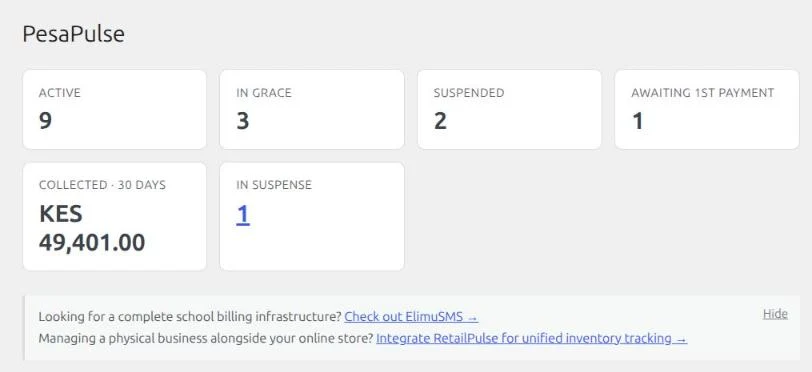
PesaPulse · Dashboard (demo data)
The problem
M-Pesa is easy to accept and hard to bill with.
Hours lost to statements
Every month someone matches M-Pesa messages to customers by hand. A missing account number turns one payment into a phone call.
Money lands in the wrong place
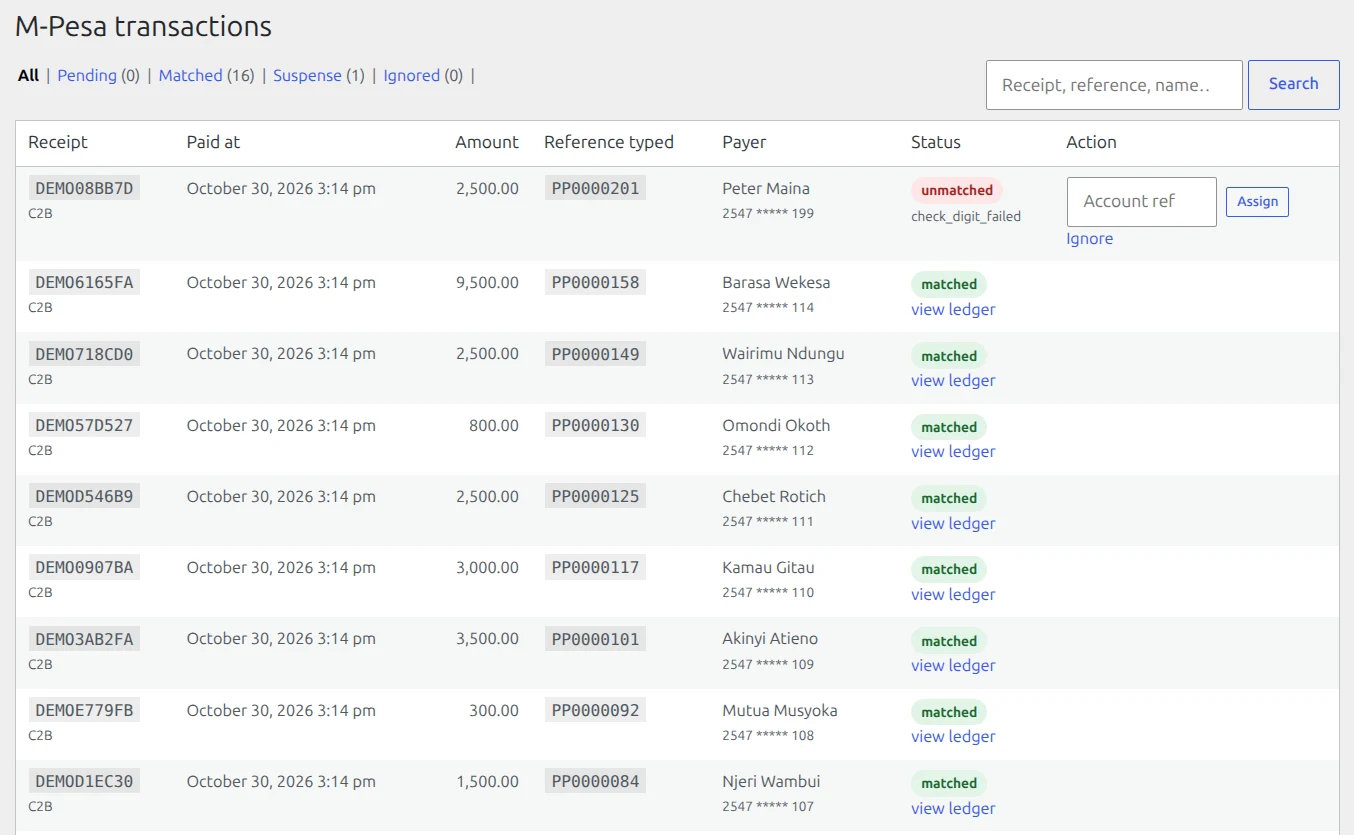
A customer types 427 instead of 472. The payment gets credited to someone else, or to no one.
Access runs on goodwill
Lapsed customers keep using the service because nobody switched them off, and paying customers wait for someone to switch them back on.
How it works
From Paybill to paid-up, without touching a statement.
M-Pesa Paybill reconciliation, done for you: no more matching M-Pesa codes, phone numbers and amounts against a bank statement by hand.
1
Give each customer an account number.
Add them in WordPress (or import a CSV with Pro). Each gets a number like PP0004270.
2
They pay the way they already do.
Paybill or Till with that account number, or Pay now on their account page: the M-Pesa prompt pops up on their phone.
3
PesaPulse credits the right account in seconds.
Safaricom notifies your site, PesaPulse checks the account number, records the receipt once, and extends the subscription.
4
Access follows payment.
Overdue accounts get a grace period, then access pauses, and comes back the moment they pay. With Pro, SMS and WhatsApp reminders go out before the due date too.
No middleman. Money goes straight to your Paybill or Till; PesaPulse only reads the payment notification.
The free plugin tells you who is overdue. Pro chases them.
M-Pesa subscription billing for WordPress: matching, suspense, ledger and access control in the free plugin.
Everything that moves money or controls access is free. Free tells you who’s overdue; Pro chases them with SMS and WhatsApp reminders, and adds reports and import.
PesaPulse
M-Pesa transactions: every Paybill payment matched to the right account automatically. The mistyped one (check digit failed) waits in suspense for you to assign.
Feature
What the customer gets
Free
Pro
M-Pesa Paybill & Till (C2B)
Payments to your shortcode are credited automatically, through your own Safaricom Daraja app
Pay now (STK Push)
Customers pay from their account page; the M-Pesa prompt comes to their phone
Typo-proof account numbers
A check digit catches every single wrong digit and swapped pair, so money never lands on the wrong account
Suspense queue
Payments with an unknown account number wait for you to assign them in one click
Never counted twice
Each M-Pesa receipt is recorded once, even if Safaricom sends it again
Prepaid credit
Partial payments add up; overpayments buy extra months
Grace period & suspension
Overdue accounts get a grace period, then access pauses automatically and returns on payment
Access control
Choose which pages or member features suspended customers lose
Overdue at a glance
Dashboard and subscription list show who is active, in grace or suspended, and what each owes
Customer account page
Plan, account number, paid-until date and Pay now
Full ledger & history
Every payment, charge and adjustment, per customer
SMS reminders
Automatic texts before the due date, during grace and on suspension, plus payment receipts, through your own Africa’s Talking account
–
WhatsApp reminders
The same reminders on WhatsApp, from your own WhatsApp Business number
–
Signed webhooks
Send every reminder and receipt to any SMS gateway, CRM, n8n or Zapier
–
Revenue & arrears reports
Monthly recurring revenue, collections by month, oldest arrears, money in suspense
–
CSV export
Subscriptions, M-Pesa transactions and the ledger, ready for Excel or your accountant
–
Bulk customer import
Move all your existing customers in with one CSV, previewed first, safe to re-run
–
Automatic updates & priority support
New Pro versions install from your WordPress dashboard; email support first in line
–
PesaPulse
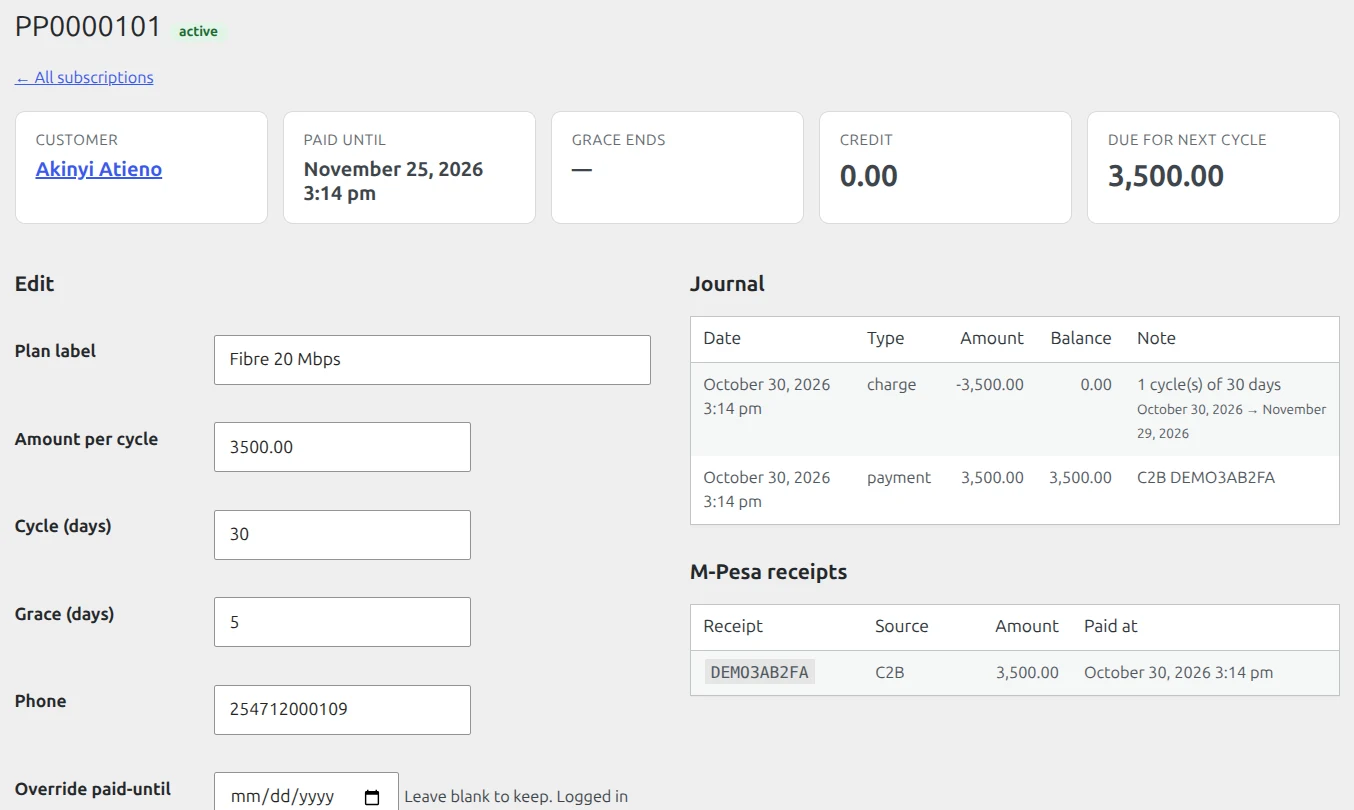
Full ledger & history: the paid-until date, every charge and payment, and the M-Pesa receipt behind it.
PesaPulse
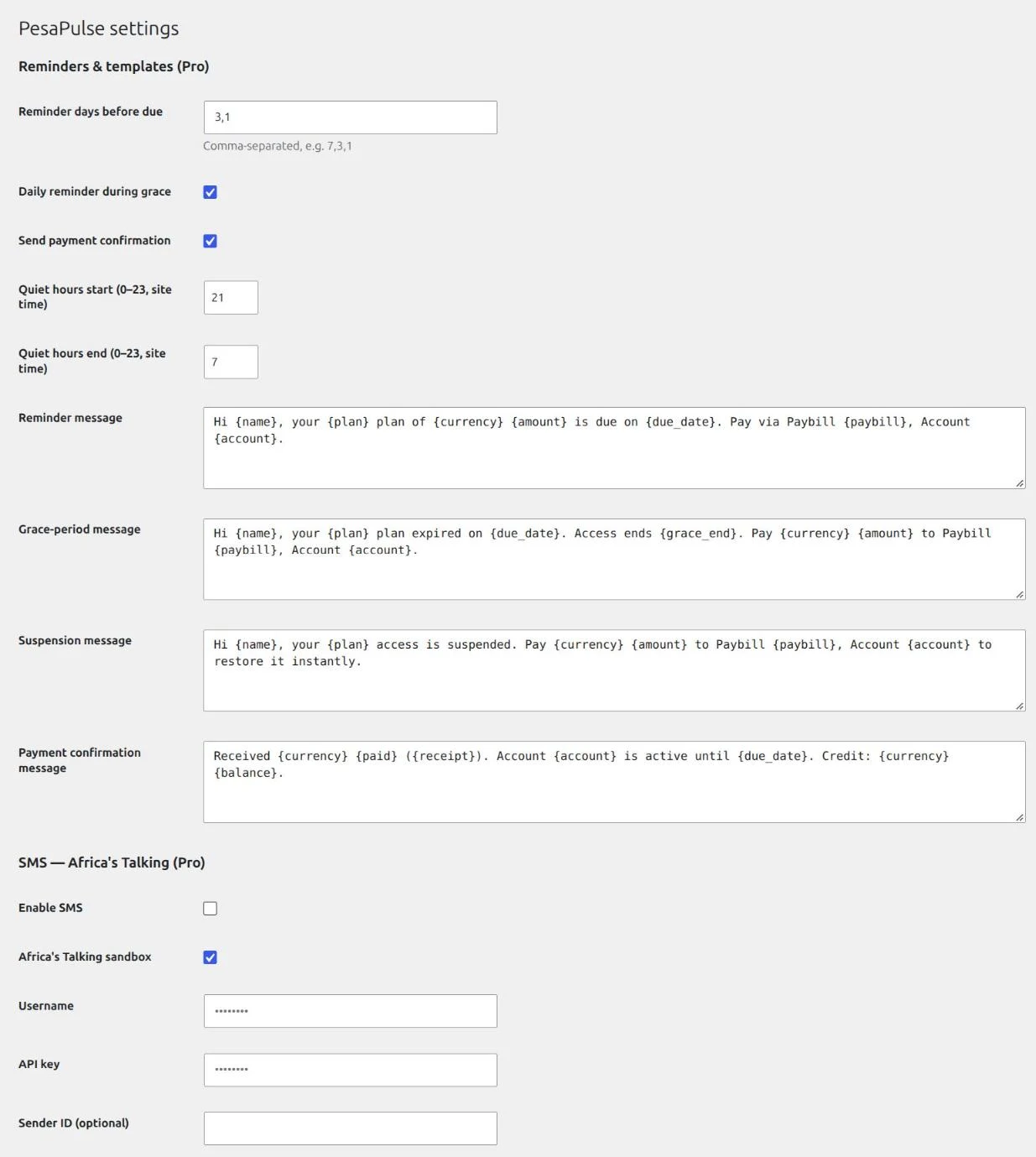
Pro reminder settings: reminder days, quiet hours and the wording of every message.
Who it’s for
Any business with customers who pay every month.
From Nairobi estates to the shops of Mombasa, wherever your customers pay by M-Pesa.
A kanga shop, Mombasa
Moi Avenue, Mombasa
Mombasa Old Town
Internet providers (ISPs, Wi-Fi hotspots)
Monthly packages; members area or router access tied to payment status
Water and utility vendors
Prepaid units or monthly service per household
Gyms, studios and clubs
Monthly memberships and class access
Schools, tutors and course creators
Parents pay school fees by M-Pesa Paybill with the learner’s account number; term or monthly fees; course pages locked until paid
Landlords and estate managers
Rent and service charges per unit
SaaS, media and membership sites
Subscriber-only content and features
Pricing
Free to bill. Pro to chase.
Free M-Pesa WordPress plugin, with Pro from KES 1,500 a month.
The free plugin runs your payments, matching and access control on as many sites as you like. Pro adds the reminders, reports and import.
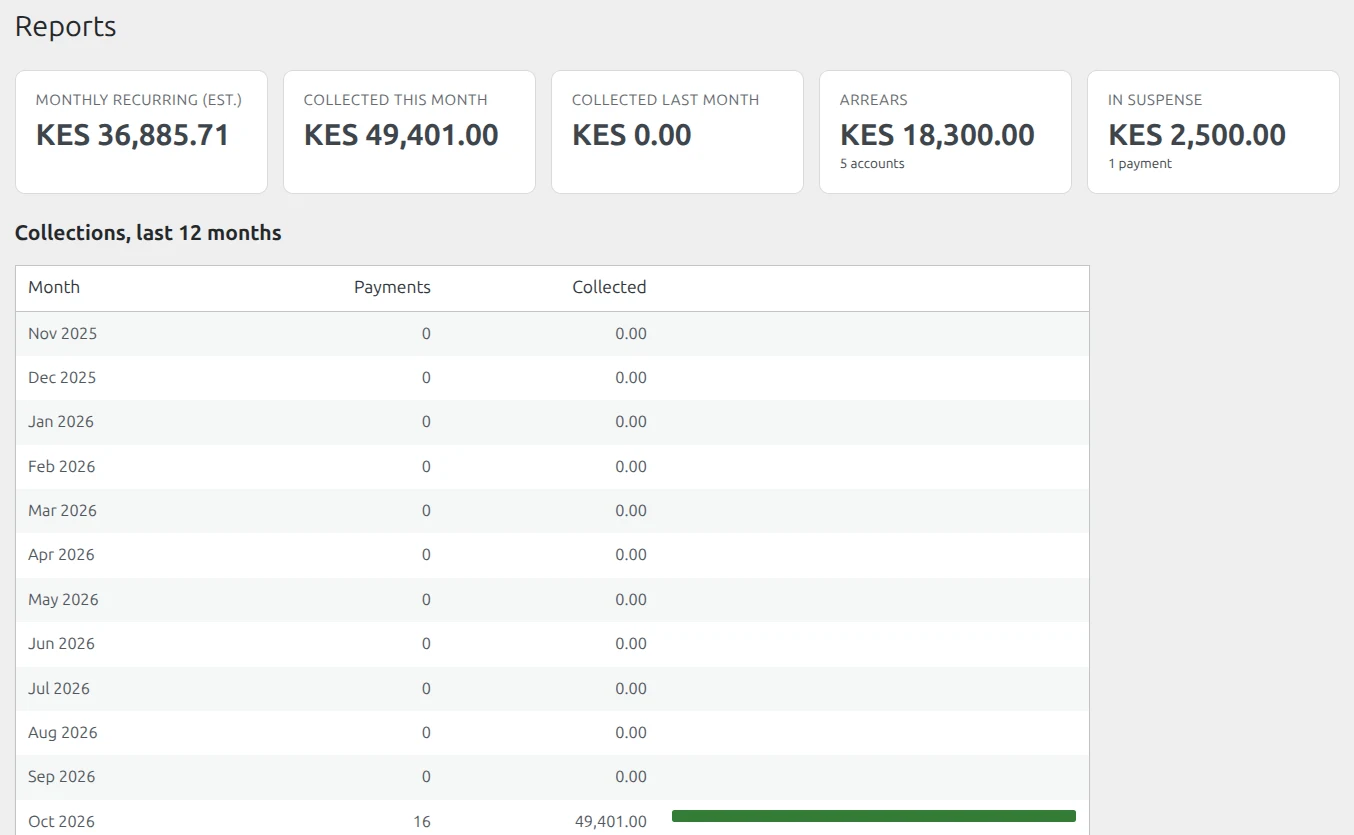
Pro reports with the demo customers: recurring revenue, collections by month, arrears and money in suspense.
Pay with M-Pesa, Airtel Money or card through Pesapal. Prices are in Kenya shillings; foreign cards are converted by your bank.
Card payers can renew automatically. M-Pesa payers get a renewal link by email 7, 3 and 1 day before expiry, and on the day it expires.
Renewing early adds time to your current expiry date, so you never lose days.
If Pro lapses, Pro features pause after a 7-day grace period. Your M-Pesa payments, matching, suspensions and access control keep working: they are part of the free plugin.
Pro activates as soon as payment is confirmed; your licence key and download link arrive by email.
PesaPulse never touches funds. Payments go straight to your Paybill or Till, and messages go through your own Africa’s Talking and WhatsApp accounts.
Each payment counts once
Every M-Pesa receipt is stored under a unique code. Duplicate or replayed notifications are ignored, and two at the same moment can’t both be applied.
Locked-down callbacks
Payment notifications are accepted only on a secret address, with an optional Safaricom-only IP allowlist.
Encrypted credentials
Your Daraja, SMS and WhatsApp keys are stored encrypted in your own database.
Your data stays on your site
Payment history lives in dedicated tables on your server. No tracking, no analytics, no customer data sent to us. Pro checks its licence once a day and looks for updates.
A full audit trail
Every payment, charge and manual adjustment is journaled with who made it and when.
Requirements
What you need
WordPress 6.2 or newer, PHP 8.0 or newer, MySQL or MariaDB
A public HTTPS address (Safaricom only calls secure URLs)
For Pro reminders: an Africa’s Talking account (SMS) and/or a WhatsApp Business (Cloud API) number
Recommended: a server cron job every 5 minutes so expiry happens on time even without site traffic
Questions people ask
PesaPulse FAQ
Do I need my own Safaricom Daraja account?
Yes. PesaPulse uses your own Daraja app and shortcode, so money goes straight to you. You can test everything in Safaricom’s sandbox first.
Does it work with a Till (Buy Goods) number?
Yes. Choose Buy Goods (Till) in Settings and enter your store number for Pay now.
What if a customer types the wrong account number?
The check digit rejects it. If Safaricom has enabled validation on your shortcode, the payment is refused before any money moves. Otherwise it waits in the suspense queue for you to assign.
Can a payment be counted twice?
No. Every M-Pesa receipt is stored once. Repeated or simultaneous notifications are ignored.
What happens when a customer pays late?
If they pay during the grace period, their new period continues from the original due date. If access was already paused, it restarts from the moment they pay, instantly.
Can I move my existing customers in?
Yes. Add them one by one for free, or import a CSV with Pro. You can set each customer’s current paid-until date so nobody is cut off.
Does the free plugin send reminders?
No. The free plugin shows who is due, in grace or suspended, and pauses and restores access automatically. Automatic SMS and WhatsApp reminders are part of Pro.
What happens if my Pro licence expires?
Pro features pause after 7 days. Payments, matching, suspensions and access control keep working: they are free forever. Reminders stop until you renew.
Can I use one Pro licence on several sites?
One licence covers one website. Move it any time by deactivating it on the old site.
Does PesaPulse see my customers’ data?
No. Your customers’ names, phone numbers, payments and history stay in your own WordPress database, and the free plugin talks only to Safaricom. PesaPulse Pro contacts our licence server once a day to check your licence and look for updates. It sends only your licence key, your site address and the version numbers of the plugin, WordPress and PHP. Pro reminders go straight from your site to the SMS, WhatsApp or webhook accounts you connect, never through us.
Getting started
Live in three steps.
PesaPulse Billing is waiting for approval on WordPress.org. Until it is listed, message us and we will send you the plugin.
1
Install PesaPulse Billing
from WordPress.org and connect your Daraja app.
2
Add your customers
and share their account numbers.
3
Watch payments match themselves
then add Pro when you want SMS and WhatsApp reminders, reports and import.