Parents pay by M-PESA and every shilling lands on the right learner’s account. Report cards come out in the correct CBC/CBE, 8-4-4 or IGCSE format. Payroll, IPSAS accounts and stores sit in the same system, on your school’s own server.
KES 100 per learner per term · first term free · all 23 modules included
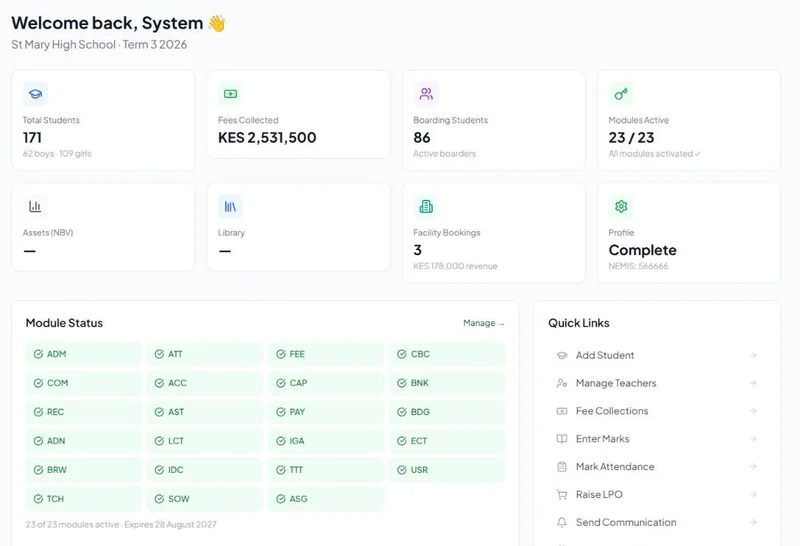
These are actual screens from Elimu SMS running with a demo school. Pick an area to see what your bursar, accountant, teachers and principal would use every day.
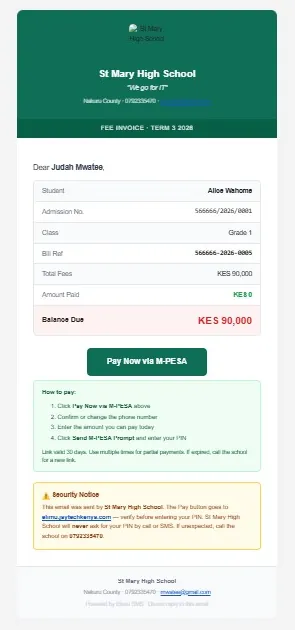
Every learner’s invoice for the term with what is due, paid and outstanding, and Send and Pay buttons on each line.
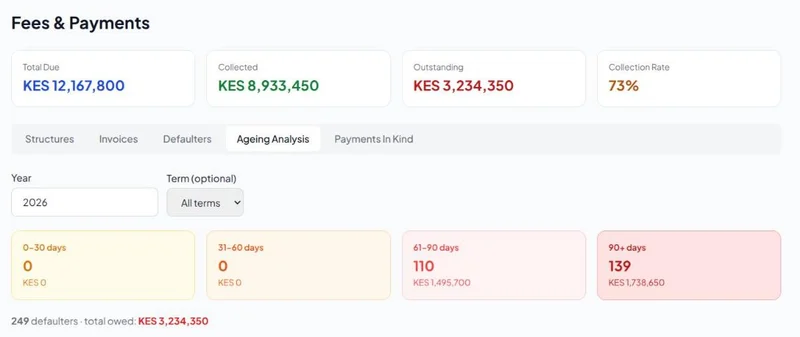
Arrears grouped by how long they have been owed, so the bursar starts with the oldest balances.
Tuition, lunch, boarding and activity fees set per grade, term and day or boarding learner.
The bursar’s daily screen: total due, collected, outstanding and the collection rate for the term, with fee structures, invoices, defaulters, ageing analysis and payments in kind one tab away.
Set tuition, boarding, lunch, transport and other vote heads per grade and term once. Every enrolled learner is invoiced automatically when the term opens.
One learner’s full ledger: what was billed, what was paid, by which method and reference, and the running balance. Print it or email a PDF to the parent.
Parents get one clear reminder listing what each of their children owes, with the paybill and the invoice number to use as the account number. Schedule them for the 1st and 15th of the month, or send on demand.
Paybill, bank and Pesalink payments that quote an invoice number post themselves. Anything else waits here for the bursar, with the amount and what the parent typed.
Bursaries, sibling and staff-child discounts, waivers and corrections, each with its own CN number. A voided note puts the amount back on the invoice.
Parents sign in with their phone number and a one-time code to see each child’s balance, attendance, notices and approved report cards, and exactly how to pay.
Every fee payment lands in the M-PESA cash book with its receipt code, and the monthly settlement to the bank is posted as a transfer.
Income from fees, capitation and income-generating activities against expenditure by vote head, for the year.
Each term’s government capitation grant, what has been spent and what is left, with a utilisation bar.
The accountant’s cockpit: balances across bank, M-PESA and cash accounts, with transactions, cash book, journals, budgets, capitation and AP/AR ageing in one place.
Income from school fees and income-generating activities against personal emoluments, depreciation and other spending, with the surplus for the year. Switch between IPSAS terms for public schools and IFRS for private schools.
Every account with its debit and credit balance at any date. Because each posting is double-entry, the trial balance always balances.
Assets, liabilities and accumulated fund as at any date, laid out the way auditors and the Ministry of Education expect to see it.
Track hall and bus hire, farm produce and other income outside fees, with bookings, payments and refunds feeding the same ledger.
Every posted entry for any account, with the opening balance, the journal behind each line and a running balance. Download as CSV or print.
Tax kept back from supplier payments, by supplier and KRA PIN, with what is owed to KRA now and a one-step remittance posted to the ledger.
A whole class’s CBC levels per learning area on one screen, with report cards approved, emailed or downloaded per learner.
Teachers pick the class, learning area and strand, then tap BE, AE, ME or EE for each learner.
Teachers plan each lesson on the KICD template: objectives, introduction, development, learner activities, resources and assessment. The AI assistant drafts the plan from the scheme of work; the teacher edits and saves.
For every teacher, subject and class, see how much of the scheme of work has been covered this term. HODs spot subjects falling behind before results suffer.
Set the academic year, term dates, half-terms and fee due dates once. Fees, marks entry, schemes of work and payroll all follow the same calendar.
One click builds a clash-free draft timetable for every class, within each teacher’s daily and weekly limits. Lessons it cannot place are listed, never forced.
Gross pay, PAYE, SHIF, NSSF and other deductions and net pay for every BOM and support staff member, with payslips per row.
The bursar computes and submits, the principal approves, the bank EFT file is generated and the run is marked paid.
Each month’s payroll in one view: gross pay, PAYE, SHIF, NSSF and the Housing Levy, net pay and headcount, ready for the board and the auditors.
Each dormitory’s evening roll call: present, absent or excused for every boarder, entered by the room master.
Learners below 85% attendance over recent school days are flagged for follow-up.
Every asset with its tag, location, cost, book value after depreciation and condition.
Bookings of the hall, field, dining hall or bus by outside groups, with deposits, payments and refunds.
From internal requisition to LPO, goods received note and supplier payment, with stock items, suppliers and spending tracked on one screen.
Every desk, laptop, vehicle and building with its tag, location, custodian, depreciation and current book value, linked to the balance sheet.
Every leaving certificate carries a signed QR code. Scanning it opens this page with the learner, the certificate number and its live status.
All enrolled learners with admission number, class and stream, county and status, and a NEMIS-compatible export.
A printable student register by class and stream with guardian contacts, on your school letterhead. Export to PDF or Excel.
Class lists per grade and stream with admission numbers, gender and boarding status: the paper backup every class teacher wants on the first day of term.
Every parent’s contact details and linked learners, so the office can see who is reachable before sending fee or closing-day messages.
Fees received by M-PESA, bank and Pesalink, cash and cheque for the term, with payments still waiting for an invoice shown underneath.
The head decides which roles see which pages; the server enforces what each role can actually do.
Every login and action logged with date, user, category and severity; records cannot be edited or deleted, even by a system administrator.
Archive old attendance, academic and financial records by the retention periods set out in Kenyan law, while audit logs are kept permanently.
Encrypted nightly backups of the whole database, with exports and a tested restore. If a computer fails, the school’s records do not go with it.
Encrypted nightly backups, invoices raised when the term opens and one fee reminder per family on the days you choose.
Demo data shown. Book a live demo to try it with your own school’s fee structure.
School fees on M-PESA in 30 seconds, and how CBC report cards are built, in about a minute.
STK Push prompts, payment links, Paybill and Till, every shilling on the right student.
Principal texts me: half the parents haven't paid fees! And the bursar is matching M-PESA messages by hand. All week. So I set up Elimu SMS. One tap on Pay sends an M-PESA prompt straight to the parent's phone. Or we send a payment link by SMS or email. Parents pay what they can. Paybill too. Every shilling lands on the right student, with a receipt. Now the principal thinks I'm a genius. Elimu SMS: school fees on M-PESA, sorted. KES 100 per student per term, first term free.
From the teacher’s tap on a strand to a PDF report card emailed to parents.
Old report cards just gave one overall math score. But the new Competency-Based Curriculum requires tracking dozens of highly specific individual skills. Take a teacher grading one specific sub-skill, like understanding fractions. They select the learning area, pick the specific strand and tap one of four performance levels, like Meeting Expectations. But repeating this strand-by-strand assessment across every subject and every student creates a massive wall of data. Normally, that would be impossible for a parent to decipher. That's where Elimu SMS comes in. The software automatically catches each individual tap and maps it into a clean, side-by-side profile proving exactly where the child is strong. Next, it pulls in the daily attendance records and adds the teacher's final remarks, assembling a finalized PDF document. With just a single approval click from the school the system emails that personalized PDF directly to the parent. So what happens to that specific fractions assessment from the teacher? It lands perfectly formatted on the parent's phone, showing them exactly where their child stands.
Animated videos; the fees video uses a computer-generated voice and real Elimu SMS screens with demo data, and the report card video uses illustrated screens.
A 5-minute walkthrough of Elimu SMS admissions: the Admit Student form, automatic admission numbers, guardians, one parent linked to all their children, the parent portal, NEMIS export and learner departures.
Plays from YouTube when you press play. Watch on YouTube · animated video with computer-generated voices; the screens are real Elimu SMS screens with demo data.
Two learners with the same admission number. A parent with three children getting three different messages. A birth certificate copy lost in a box file. If that sounds like your school, stay to the end. Today we go deep into Module 1 of Elimu SMS, admissions and students. Welcome to The JayTech Brief. Our intern set up Elimu SMS at a school and today she shows us how a learner gets into the system, how parents are linked, and what happens when a learner leaves. Let's start with admission day. What usually goes wrong? Admission numbers are written by hand in a book, so two learners can end up with the same number. Birth certificate copies sit in box files. Parents' phone numbers are kept in three different places and nobody is sure which class still has space. So what does admitting a learner look like in Elimu? Open Students and click Admit Student. One form captures the learner's full name, date of birth, birth certificate number, UPI number, any special needs and the previous school. Then you choose the class and stream. And all that paper, the birth certificate, the transfer letter, is uploaded straight to the learner's profile together with the passport photo. Anyone with the right access can open them in seconds. No more box files and no more lost copies. How are admission numbers given? Automatically. Elimu gives every learner the next admission number, so two learners can never share a number. The number goes onto a barcode, and the learner's ID card carries a barcode and a signed QR code for the school gate. What about putting learners in the right class? Under Classes and Streams, every class has its streams, a class teacher and a bar showing how full it is. The Ministry's maximum class sizes are shown for each curriculum, and a mixed school can run CBC, JSS, 8-4-4 and IGCSE side by side, with Senior School pathways too. Now parents. How are guardians recorded? Each learner has one or more guardians: mother, father or guardian. One is marked as the primary contact and one as the emergency contact. If a guardian should not get messages, the school can block their SMS with a reason and unblock it later. A blocked guardian also cannot sign in to the parent portal. Here is the big one: a parent with three children in the same school. Is that three separate records? No. One guardian record is linked to all their children. The Parents and Guardians page shows how many children each guardian has. In the parent portal, one sign-in shows all three children, each child's balance and the total for the family, and fee reminders go once per family, listing each child's invoice number, instead of three separate messages. How does a parent sign in? With their phone number and a six-digit code sent by email, or by SMS when there is no email. The code expires in 10 minutes. Inside, each child has fees, attendance and report cards, plus how to pay: the Paybill, the bank details and the right account number to use. What about a whole new intake, say 200 Grade 7 learners? Nobody types 200 forms. Download the spreadsheet template, fill it in and import it. Elimu creates the learners in one go. And when the Ministry asks for learner data, click NEMIS export. You get a NEMIS-compatible file with student data and guardian details. Under Reports there is also the student register, class lists and a parent and guardian report, all printable with the school's name and logo. What happens when a learner leaves the school? The departure workflow clears them department by department: fees, library, boarding and the rest. The record is archived and SMS to that family stops. It stays searchable, and the data archive follows Kenyan retention rules: academic records for 7 years and financial records for 10. Learner data is sensitive. Who can see it? Elimu has 13 roles, and the access matrix decides which role sees which page. The school can change it at any time. Every change goes into an audit log, and the data stays on the school's own server, in line with the Data Protection Act. So how much is it, and how does a school start? 100 shillings per student per term, with all 23 modules, and the first term is free. One-time setup, installation and training is 70,000 shillings. Visit jaytechkenya.com/elimu-sms or WhatsApp 0792 335 470. Next episode: Module 2, attendance and the safety roll. Subscribe so you don't miss it. Our intern is a genius. Thanks for watching.
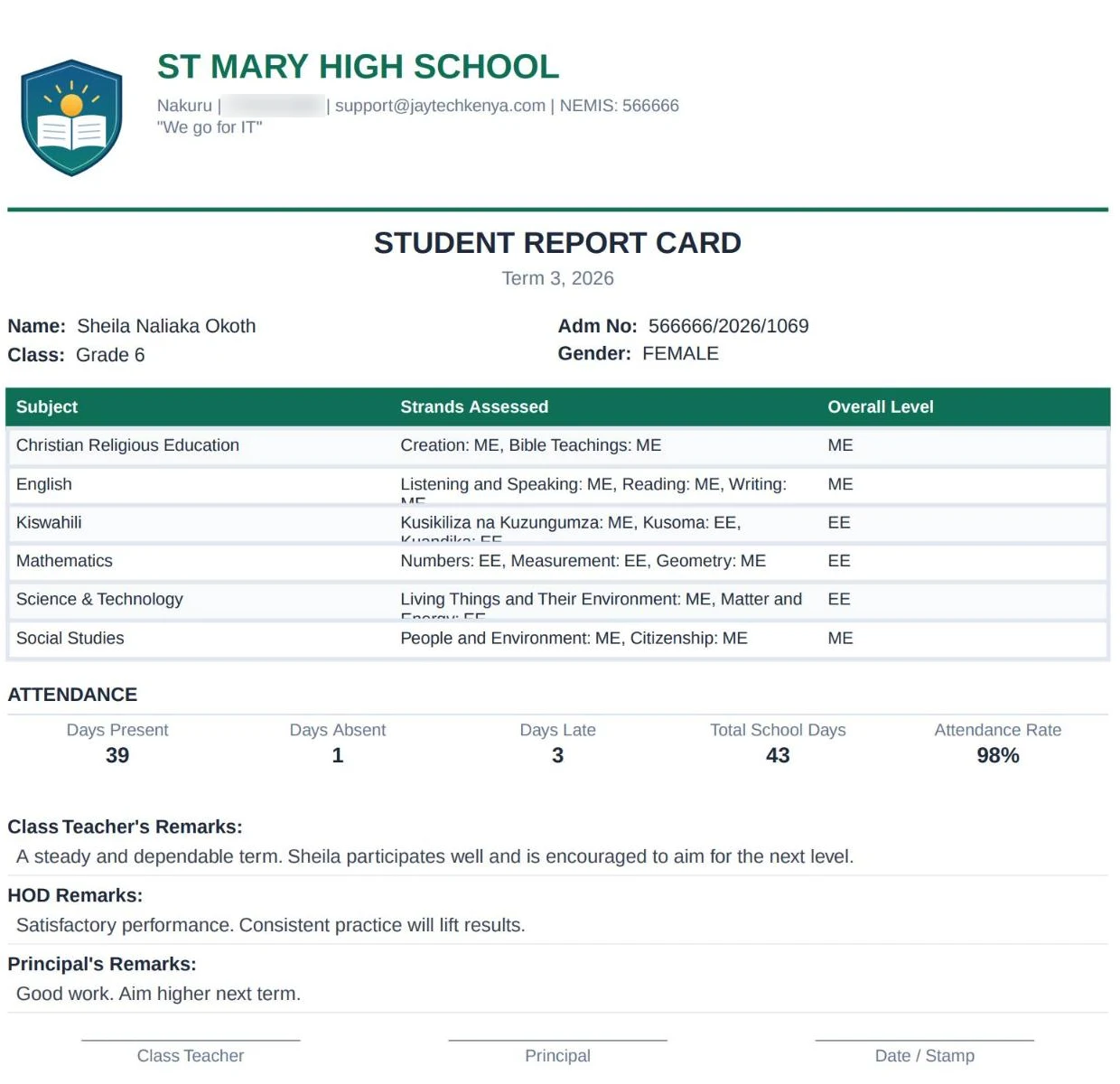
Sample report card from the Elimu SMS demo school. Learner and school are fictional.
Every learning area shows the strands assessed and the level reached, so a parent sees where their child is strong, not just a grade. The card is produced from the assessments teachers already entered, approved by the school and emailed to every parent in one click.
The screens on this page come from “St Mary High School”, our fictional demo school, loaded with a full year of realistic data. Ask for a demo and we’ll walk you through it live.
Demo school data, not a customer. Your school starts with its own records.
Follow the money, the learners and the staff through Elimu SMS.
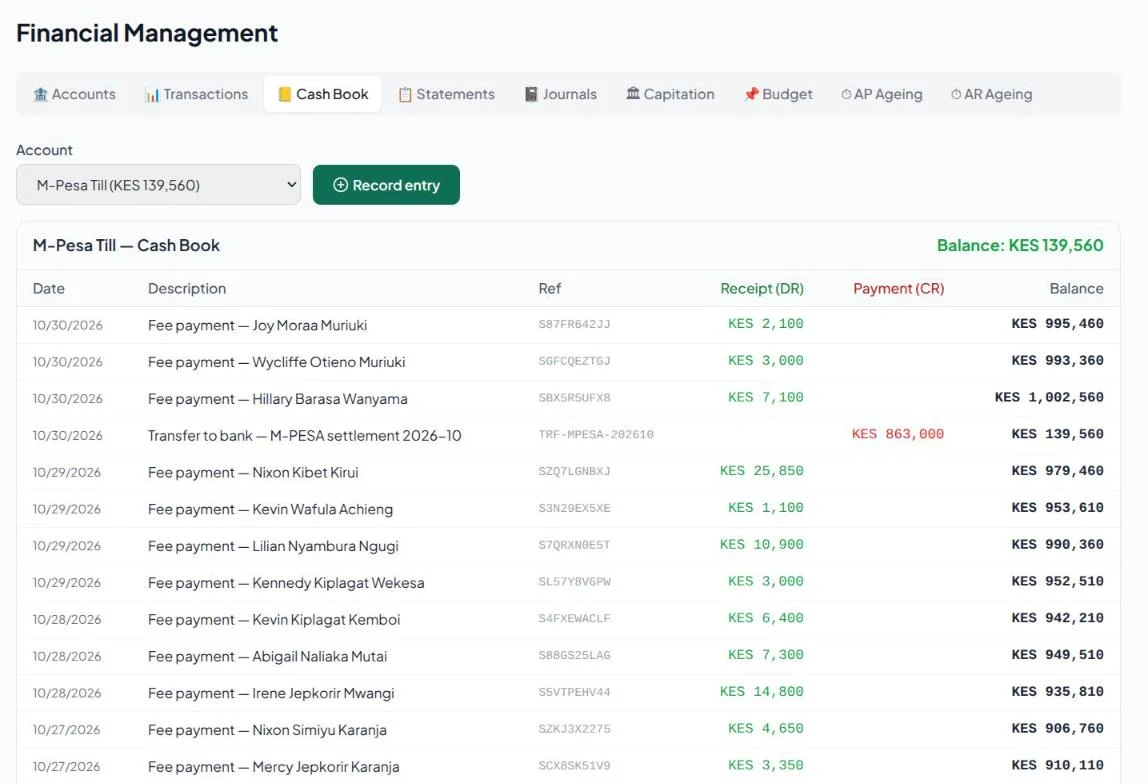
A parent pays the school Paybill using the invoice number (the admission number also works). The payment is matched to the learner, the receipt goes out, and the line appears in the M-PESA cash book with its receipt code. The monthly settlement to the bank is a recorded transfer, not a guess.
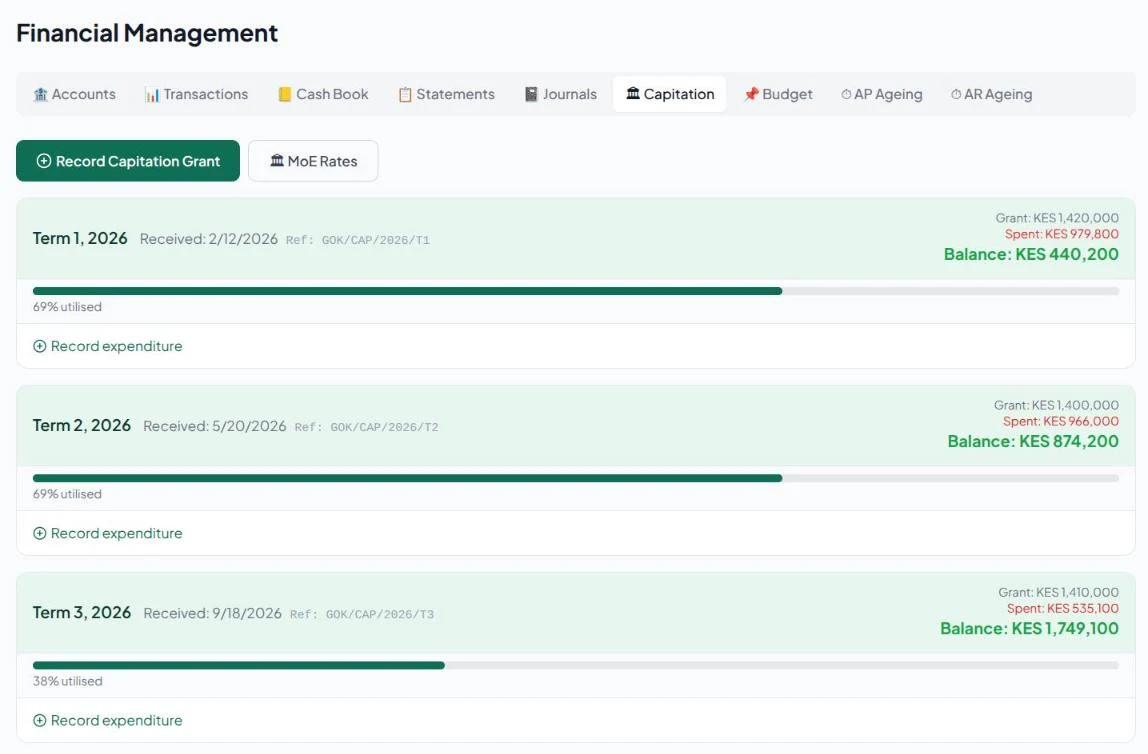
Record each term’s government capitation grant with its reference, spend against it and see what is left. When the auditor asks how the grant was used, the answer is one screen.
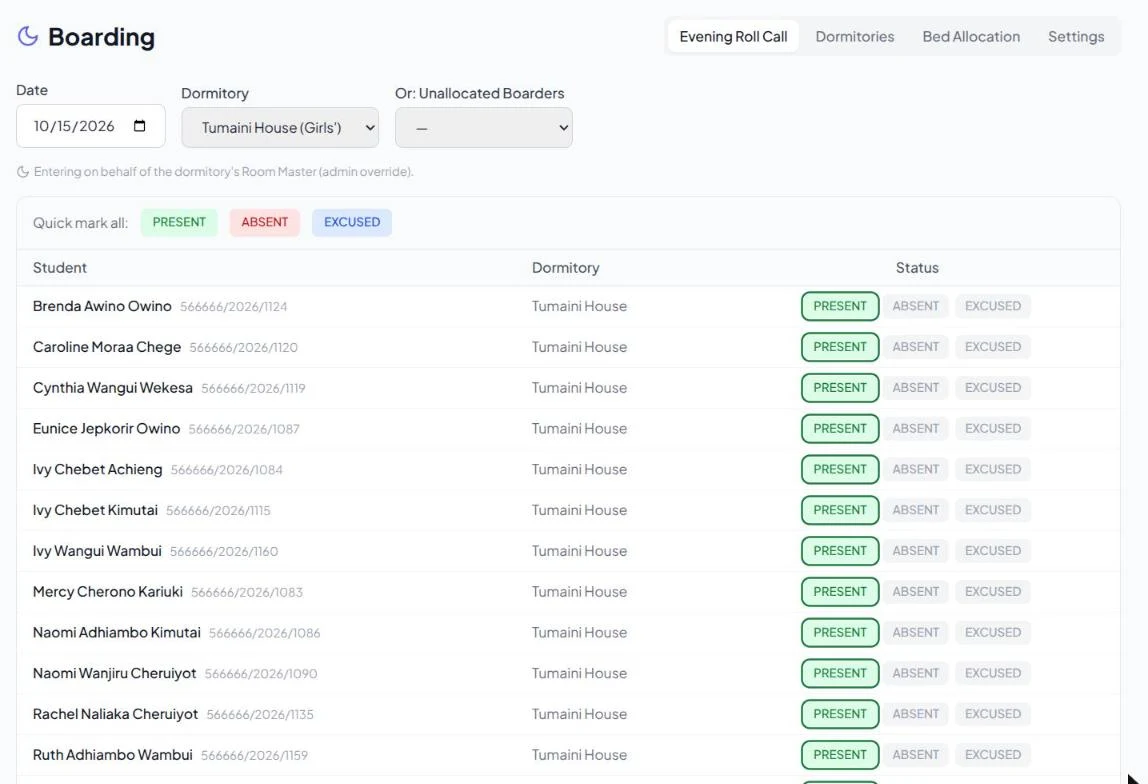
The room master marks each boarder present, absent or excused. The matron and deputy see who is missing before lights out, and the record stays for the parent meeting.
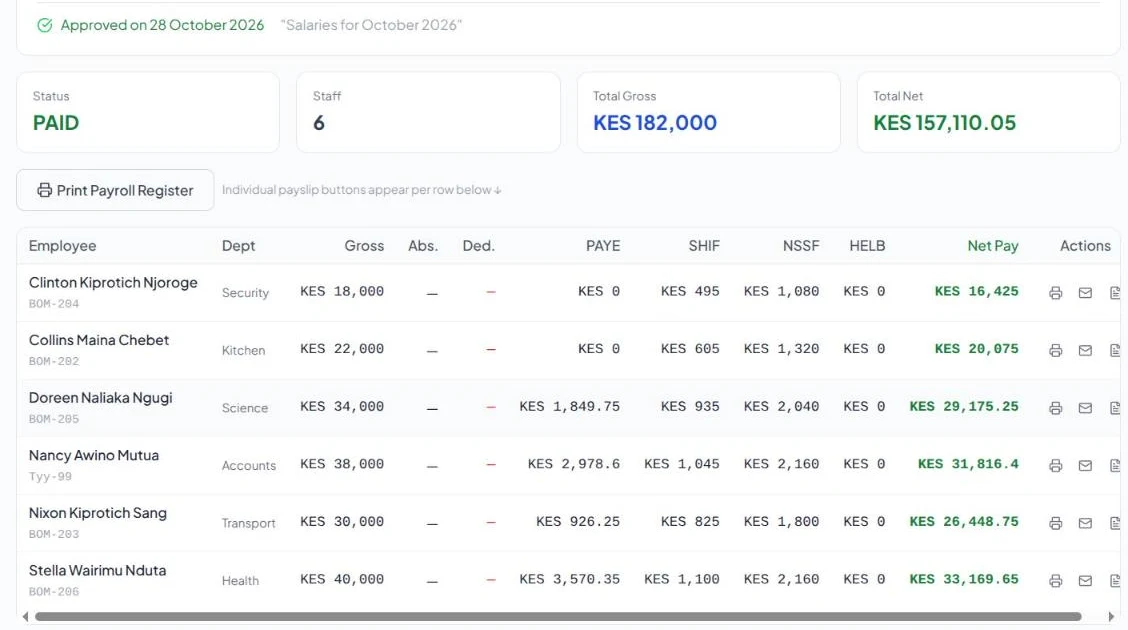
BOM teachers and support staff are paid through a five-step chain: compute, bursar submits, principal approves, bank EFT file, confirm paid. PAYE, SHIF and NSSF are worked out for each person, with a payslip per row.
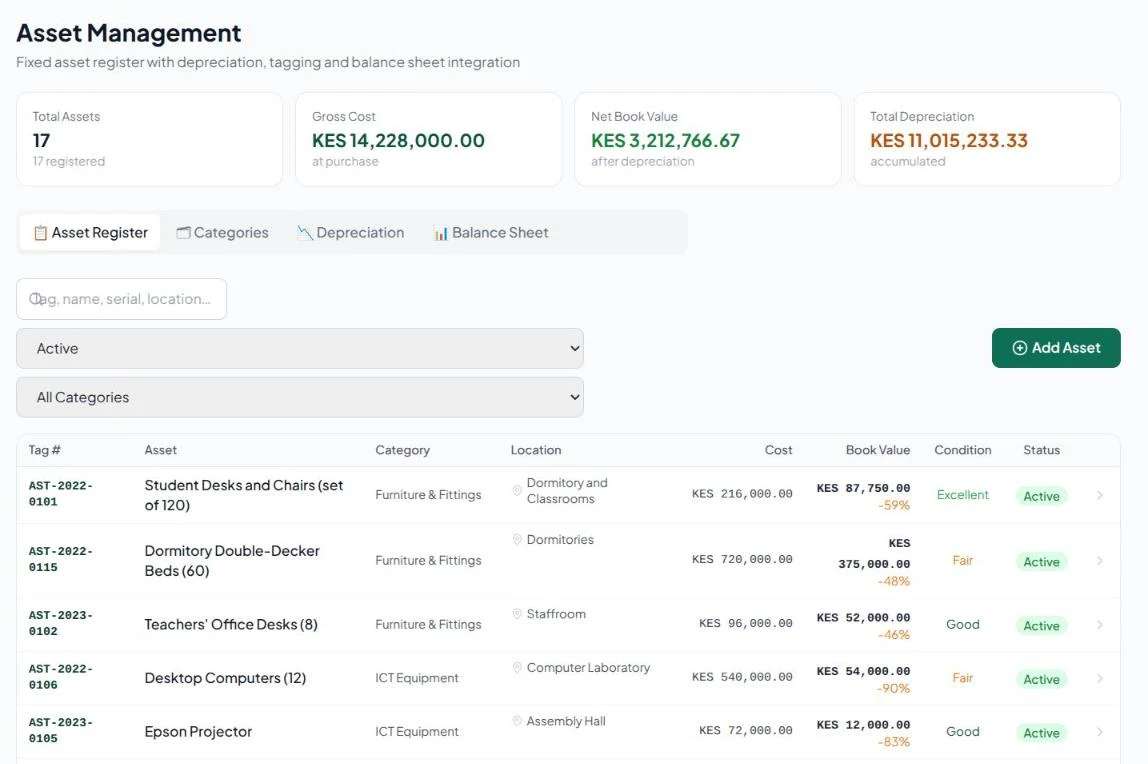
Every desk set, computer and bed is tagged with its location, cost and depreciated value. When outside groups hire the hall, field or bus, bookings, deposits and refunds are tracked and the income lands in the books.
Each one prints with the school’s name and logo. Nothing to build, nothing to export to Excel first.
STK Push, Paybill/Till and signed payment links, with every shilling matched to the right learner. Parents pay from home and nobody types receipts.
Elimu SMS runs on a machine in your school, not a shared cloud. You own every record, in line with the Data Protection Act 2019.
CBC/CBE, JSS, Senior School, 8-4-4 and IGCSE, each with its own report card and grading. TVET and university records, fees and results too.
Draft KICD-aligned schemes of work, lesson plans and exams with marking schemes in minutes. The teacher reviews and decides.
Double-entry ledgers, IPSAS statements, procurement approvals, period locks and an audit trail nobody can edit. Ready for the auditor any day.
KES 100 per learner per term. No per-user fees, no hidden charges, all 23 modules included, and the first term is free.
No separate spreadsheets for fees, marks, payroll and stores, and no extra charge per module. Here is what each part of Elimu SMS does for a Kenyan school.
Book a free demoEach staff member gets their own login and one of 13 roles, from principal, deputy and bursar to class teacher, librarian and storekeeper. An access matrix sets exactly what each role can view, create, edit or approve, without touching code. Failed logins are throttled, idle sessions time out, and an append-only audit log records every sensitive action with the user and the time. The licence activates offline with a signed code, so nothing has to phone home.
Enter the school name, motto, KRA PIN and logo once; they print on every receipt, report card, ID card and leaving certificate. Set the academic year, terms, half-terms, holidays, grading bands and assessment weights. Send email from the school’s own address, and connect your M-PESA Paybill or Till through Safaricom Daraja.
A full student register with photo, admission number, class, stream and guardian details, plus CSV import for new admissions. Guardians are linked to each learner, and parents sign in to the parent portal with their phone number and a one-time code to see fees, attendance and released report cards. ID cards carry a signed QR code; at the gate a registered phone checks the QR and the learner’s fingerprint, logs the entry and texts the parent.
Heads of department publish the KICD-aligned syllabus. Teachers build schemes of work week by week, send them for HOD approval and refresh them when the syllabus changes. Lesson plans follow the KICD template, with an AI assistant that drafts the plan for the teacher to edit. A coverage report shows which classes are behind, and the timetable generator produces a clash-free master timetable.
Teachers mark the daily roll on a phone or laptop. Every tap saves instantly and registers lock at 4pm; after that only the HOD or principal can re-open one. Parents of absent learners get an SMS the same morning. Staff clock in and out from a tablet, a phone or the gate kiosk.
Enter marks once in a single grid; averages, positions and performance levels are calculated for you. Report cards come out in the right format for each curriculum: CBC/CBE with EE, ME, AE and BE levels, 8-4-4 with CAT, exam and KCSE grades and points, JSS with competency indicators, and IGCSE with grades A* to G. Print in bulk or email every parent the day results are approved. An AI generator drafts KPSEA-style papers with marking schemes.
Set fee structures per class and term and every learner is invoiced at term start. Payments by M-PESA STK Push, Paybill, Till, bank transfer or Pesalink are matched by invoice number or admission number; anything else waits in the Incoming Payments inbox. Cash, bank and cheque receipts take seconds. Parents get an SMS receipt for every payment, statements, and one family reminder on the 1st and 15th. Bursaries, sibling discounts and waivers are issued as numbered credit notes. The bursar sees defaulters, ageing analysis and payments in kind.
A master file for every teacher and worker: TSC number, KRA PIN, subjects, qualifications and salary band. Leave requests follow Employment Act 2007 entitlements. The monthly payroll computes PAYE, SHIF, NSSF and the Housing Levy, produces payslips and posts the wages journal.
A full double-entry ledger with journals that cannot be overwritten. Produce the trial balance, statement of financial performance, balance sheet, cash-flow statement and vote head analysis for any period, in IPSAS terms for public schools or IFRS for private ones. Bank reconciliation, budgets, capitation and income-generating activities all feed the same books.
Allocate boarders to dormitories and run the evening roll from a phone. Issue library books by learner name or admission number. Procurement runs from an approved LPO to goods received and payment, with withholding tax deducted where it applies. The asset register tracks tags, custodians and depreciation, and halls and buses can be hired out with bookings and payments.
Send messages to a class, a year group, all parents or one person, by bulk SMS or email, with delivery reports kept for every message. Parents see fee statements, attendance, notices and approved report cards in the parent portal, and how to pay each invoice.
One index of every report: student registers, class lists, attendance summaries, at-risk learners, parent contacts, scheme coverage and financial statements, on your letterhead, in PDF, CSV or Excel, including a NEMIS data export for learner records.
When a learner leaves, the system checks library books, fees and boarding items before issuing a leaving certificate with QR verification. Old records are archived by Kenyan retention rules while staying searchable, and the whole database is backed up every night with AES-256 encryption.
Stop chasing balances and typing receipts. Parents pay however suits them, and every payment lands on the right student's account automatically.

Parents pay by M-PESA, the system matches every payment to the right learner, and report cards come out on time.
Book a free demo →One-time setup, training & installation: KES 70,000
A simple per-term example by enrolment:
Tell us a little about your school and we'll set up a personalised walkthrough, in person or online. No cost, no obligation.
We'll get back to you within one working day.
On your school's own server, on your premises, not a shared cloud. You own and control every record, fully in line with the Kenya Data Protection Act 2019. If your internet goes down, your data stays exactly where it is.
Yes, Elimu SMS is M-PESA native. It supports STK Push (prompt to the parent's phone), Paybill/Till (C2B) and secure payment links, and every payment is automatically reconciled to the correct student's fee account.
CBC/CBE, JSS, Senior School, 8-4-4, IGCSE and early years (PP1 to PP2), each with its own report card and grading. TVET colleges and universities are supported for records, fees and results entry. Mixed-curriculum schools are fully supported.
A one-time setup of KES 70,000 (installation, training and configuration), then KES 100 per student per term. All 23 modules are included, with no per-user fees, and your first term is completely free.
A desktop or small server at the school, an internet connection, an M-PESA (Daraja) API account, a bulk-SMS account, a domain name and a Gmail account for email, plus, optionally, a barcode scanner for student gate entry, a smartphone for the staff attendance register, and a laminator and printer for ID cards. We assess your setup and configure everything during onboarding.
Typical onboarding is about 8 weeks end-to-end: installation, data migration, M-PESA and SMS configuration, ID cards, and staff training, after which you run your first term free.
The best system is the one that matches how your school collects fees and reports results. Check four things: real M-PESA reconciliation to each learner, report cards in the correct CBC/CBE format, IPSAS accounts if you are a public school, and where your data is stored. Elimu SMS covers all four and runs on your own server.
Yes. Elimu SMS keeps a double-entry ledger and produces the statement of financial performance, statement of financial position, cash flow, trial balance and vote head analysis. One setting switches between IPSAS terms for public schools and IFRS for private schools.
Yes. The reports module includes a NEMIS data export for learner records, alongside class lists, student registers and attendance summaries.
It is installed on a server at your school, so your records stay with you. Parents still reach their portal and pay by M-PESA, and Jaydee supports the system remotely with read-only access that is logged.
Yes. Elimu SMS Portal (Version 1.0) is registered as a literary work, registration number RZ101710, (computer software) with the Kenya Copyright Board (KECOBO) on the National Rights Registry, in the name of its author, Judah Mneni Mwatee of Jaydee Innovation Hub. Copyright registration records who owns the software. It is not a product approval or certification.
Beyond schools, Jaydee Innovation Hub builds RetailPulse, a complete retail & wholesale system with live M-PESA, KRA eTIMS and 4 AI engines, all on your own server.
The fast, accountable everyday till, scan, take M-PESA, print or email the receipt, and know your real profit daily.
Explore POS →Sell by the bale or the piece with the right price per quantity, and keep every credit customer in line with AI risk scoring and SMS.
Explore Wholesale →Open tabs by table, pour spirits by the tot, fire orders to kitchen & bar screens, and reconcile every bottle.
Explore Bar & Lounge →Weigh-to-price at the counter with silent yield and moisture-shrinkage tracking, so the meat and the money stay accounted for.
Explore Butchery →