M-PESA POS for Kenyan shops

A POS where M-PESA payments match themselves to the sale.

Send an STK Push from the till or let customers pay your Paybill or Till. RetailPulse confirms each payment through Safaricom’s Daraja API and matches it to the sale, so the cashier never has to read an SMS again.

From KES 2,500 a month, billed yearly · setup from KES 25,000 · no per-user fees

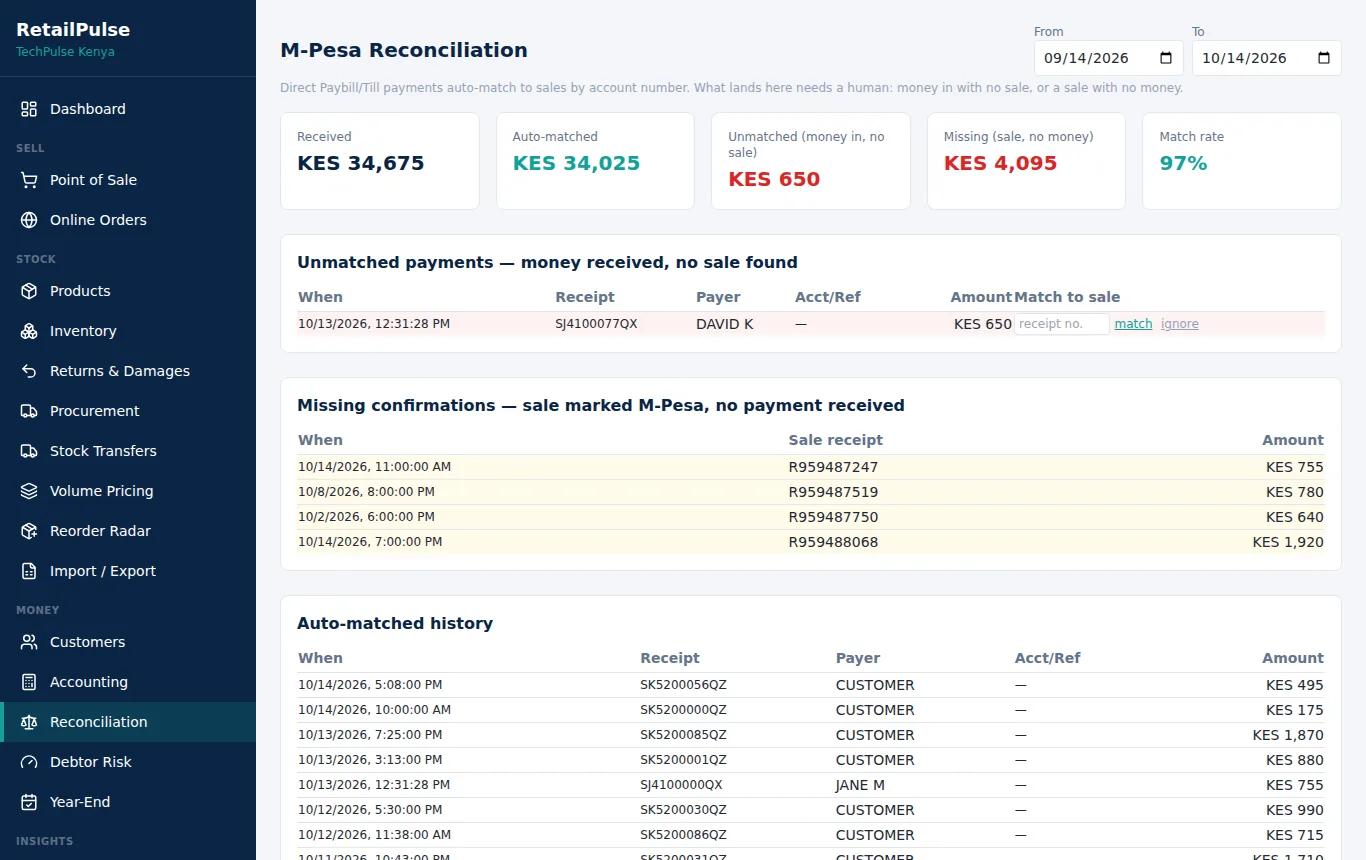
RetailPulseRetailPulse M-PESA reconciliation screen with received, auto-matched, unmatched and missing payments and a 97% match rate
Safaricom receipt matched to sale
The M-PESA problem at the till

“Nimetuma” is not a payment confirmation.

In most Kenyan shops more than half of sales are paid by M-PESA, yet the cashier still checks a phone for the confirmation SMS and types the amount into the till. Fake messages, delayed confirmations and wrong amounts all slip through, and at the end of the day nobody can say exactly which M-PESA payment belongs to which sale.

RetailPulse takes M-PESA out of the cashier’s hands. For STK Push, the till sends the payment prompt to the customer’s phone for the exact amount and waits for Safaricom’s confirmation. For Paybill and Till payments, the confirmation arrives through Daraja and is matched to the open sale. Either way, the payment is recorded with its M-PESA reference before the receipt prints.

At closing time the M-PESA total on the till matches the M-PESA statement, because every shilling was confirmed by Safaricom rather than typed by a person.

What it does

M-PESA done properly, inside a full POS.

Part of RetailPulse, the complete retail and wholesale system for Kenya.

Request a demo

M-PESA charges recorded for you

The Buy Goods fee on every payment (free up to KES 500, 0.55% above, capped at KES 200) posts to Bank & M-PESA Charges, so the till balances with your statement. Read our 2026 guide.

STK Push at checkout

The till sends a payment prompt for the exact amount; the sale completes when Safaricom confirms.

Paybill and Till via Daraja

C2B confirmations arrive through the Daraja callback and are matched to the sale automatically.

Split payments

Part cash, part M-PESA, part card, all on one receipt, with each tender recorded correctly.

AI M-PESA reconciliation

RetailPulse’s reconciliation engine flags payments that don’t match a sale, so gaps surface the same day.

eTIMS receipts

Each sale also gets a KRA eTIMS invoice number and QR code.

Works offline

The till keeps selling when the internet drops and syncs payments and invoices when it returns.

End of day

Closing the till: before and after

What changes at closing time when M-PESA confirmations come from Safaricom instead of the cashier’s phone.

TaskTypical tillRetailPulse
Confirming paymentsCashier reads SMS on a phoneSafaricom confirmation via Daraja
Recording the amountTyped by handExact amount from M-PESA
Fake or duplicate messagesHard to spotNot possible; only confirmed payments count
ReconciliationCompare statement line by lineM-PESA total already matches
ResultShortages found days laterGaps flagged the same day
Real screens

M-PESA in RetailPulse, from till to bank

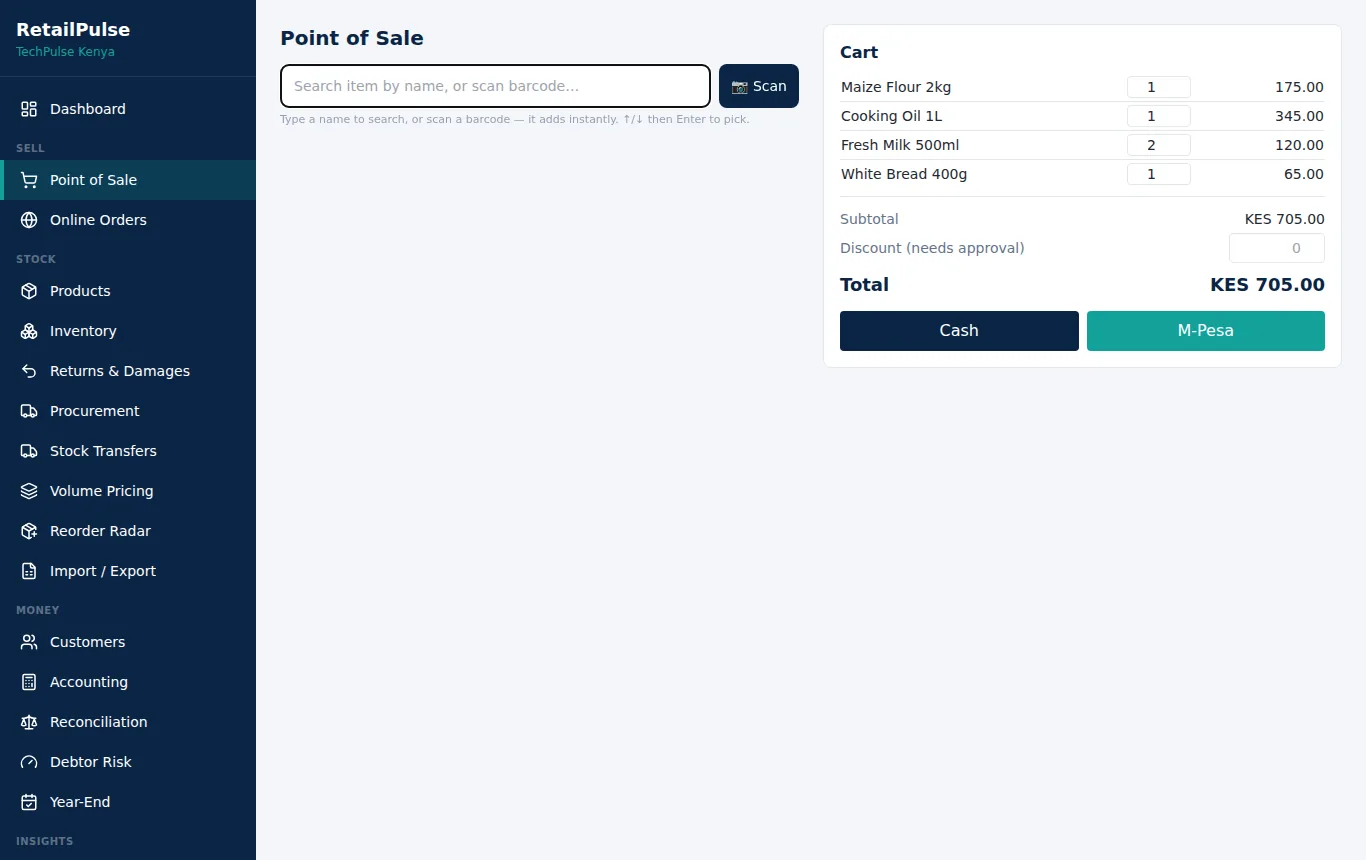
RetailPulse Point of saleThe M-PESA button sends an STK push for the exact amount to the customer’s phone. screen
Point of saleThe M-PESA button sends an STK push for the exact amount to the customer’s phone.
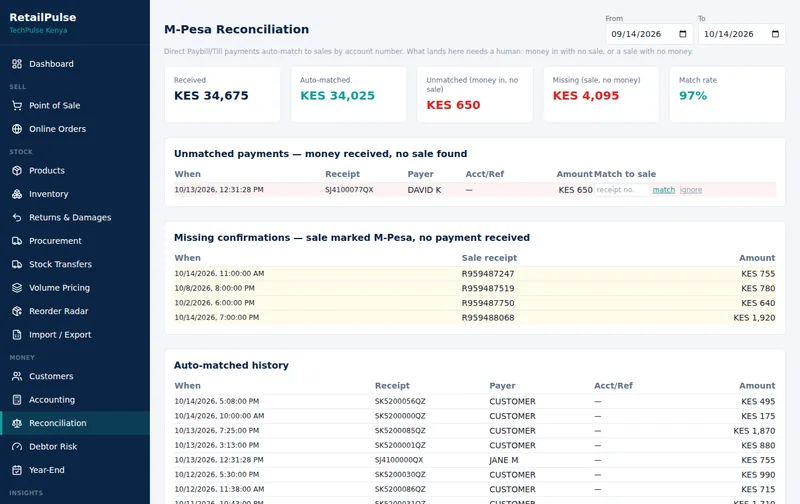
RetailPulse M-PESA reconciliationSafaricom receipts are matched to till sales by receipt number and amount. Two lists need a human screen
M-PESA reconciliationSafaricom receipts are matched to till sales by receipt number and amount. Two lists need a human: money received with no sale, and sales marked M-PESA with no payment. The match rate for the period sits at the top.
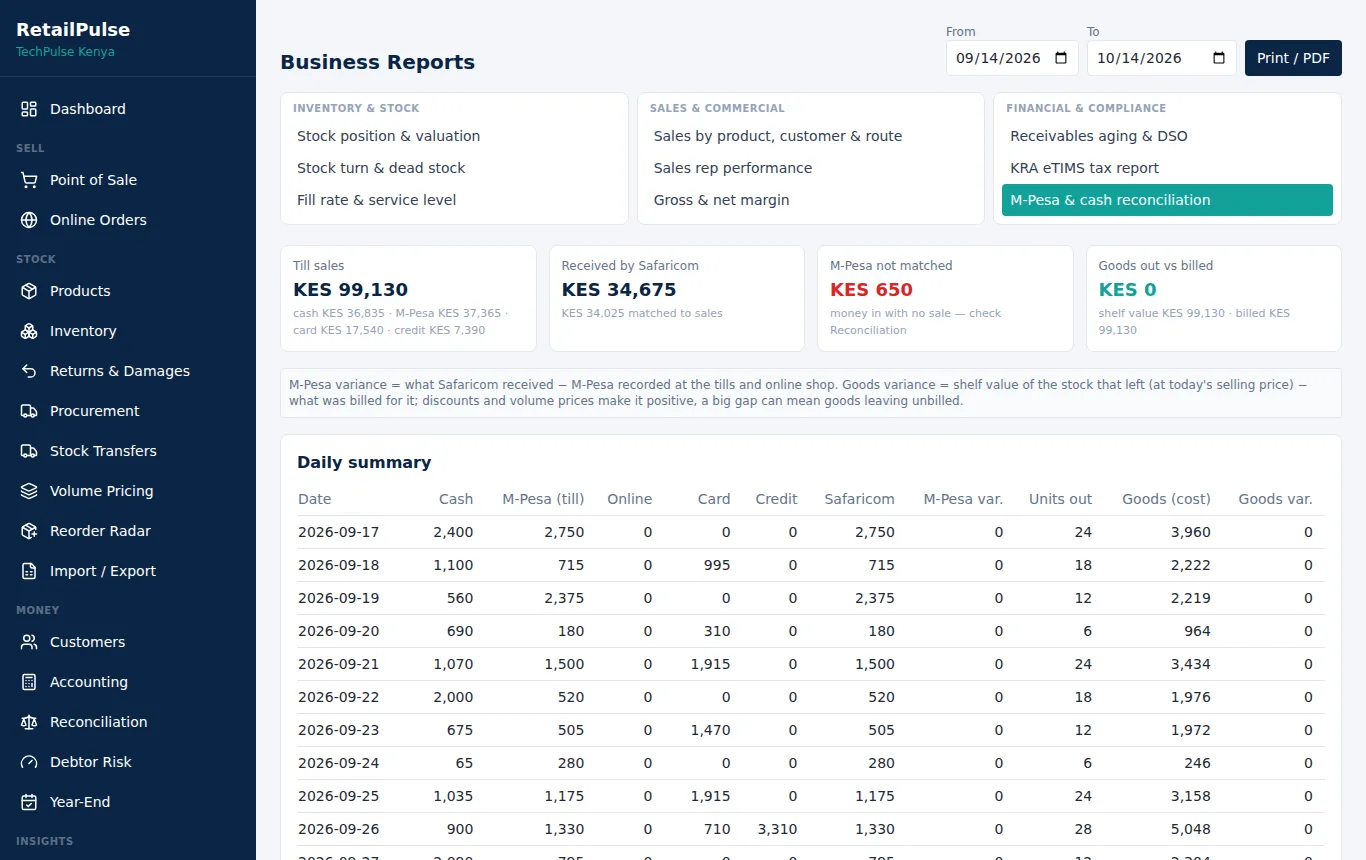
RetailPulse Business reports screen
Business reports: cash and M-PESAA daily summary of cash, M-PESA, online, card and credit takings against Safaricom receipts and against the goods that actually left the shelves. A big gap between goods out and money billed is the first sign of unbilled stock leaving the shop.
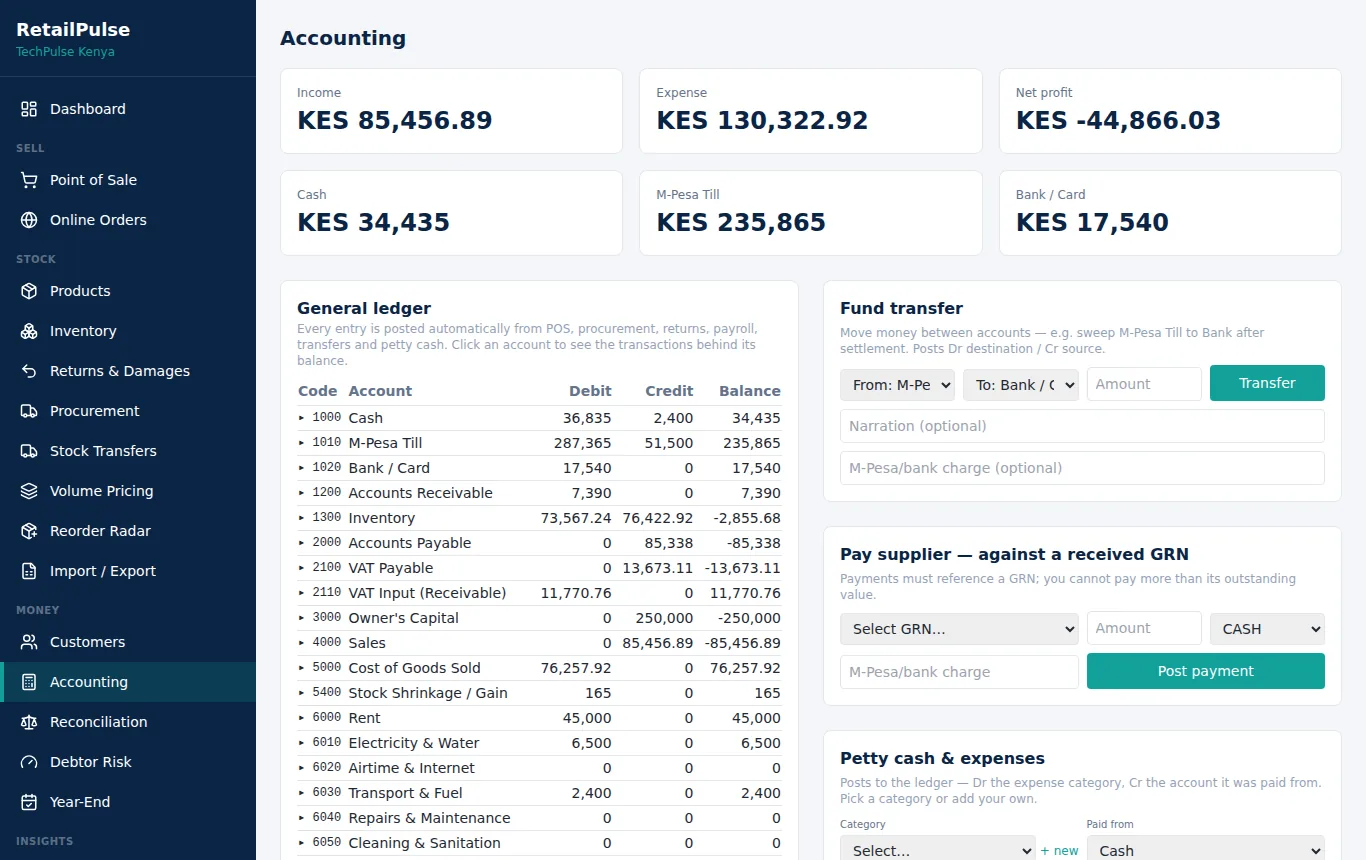
RetailPulse AccountingSweep money from the M-PESA till to the bank with the charges recorded, and see cash, M-PESA and bank balances side by side. screen
AccountingSweep money from the M-PESA till to the bank with the charges recorded, and see cash, M-PESA and bank balances side by side.

Fictional demo data. See all RetailPulse screens

Where M-PESA money goes missing

The two lists that catch M-PESA losses.

The RetailPulse reconciliation screen splits M-PESA problems into the only two kinds that matter:

Everything else is matched automatically by receipt number and amount, and the match rate for the period sits at the top of the screen. In the demo store shown above, 97% of M-PESA payments matched on their own and the rest were listed by date and amount.

At the end of each day, the cash and M-PESA report puts cash, M-PESA, online, card and credit takings next to what Safaricom actually received and the value of goods that left the shelves. If the shop is short, you see it the same evening, not at the end of the month.

After the money arrives

From till to bank, in the books.

Fund transfers move money between your M-PESA till, bank and cash accounts with any M-PESA or bank charge recorded as an expense, so your M-PESA balance in RetailPulse matches the balance on your Safaricom statement.

Your Daraja consumer key, secret and passkey are stored encrypted on your own server, never in plain text.

Questions people ask

Frequently asked questions

Does RetailPulse support STK Push?

Yes. The till sends an STK Push to the customer’s phone for the exact amount and completes the sale when Safaricom confirms.

Can customers pay our existing Till or Paybill?

Yes. RetailPulse connects to your existing Till or Paybill through Daraja and matches confirmations to sales.

Can a customer pay part cash and part M-PESA?

Yes. Split payments across cash, M-PESA and card are recorded on one receipt.

Does it work without internet?

Yes. The till keeps working offline and syncs when the connection returns. STK Push itself needs a connection at the moment of payment.

How much does it cost?

RetailPulse plans start at KES 2,500 a month, billed yearly, with a one-time setup of KES 25,000 for a single shop with one till. Shops and pharmacies with up to 3 tills pay KES 5,000 a month, bars and restaurants KES 6,500, and supermarkets, butcheries and wholesalers with unlimited tills KES 9,500. There are no per-user fees; hardware, internet and third-party fees are the business’s own costs.

What if a customer pays but the cashier doesn’t ring up the sale?

The payment appears on the “money received, no sale found” list and sits in a suspense account until it is matched or explained, so it cannot quietly disappear.

Does RetailPulse record M-PESA till and bank charges?

Yes. Set the tariffs once: the Lipa na M-PESA Buy Goods rule (free up to KES 500, 0.55% above, capped at KES 200, Safaricom’s tariff from 7 August 2026, all editable), Paybill bands, card commission and charges on money sent out. Every M-PESA or card payment received, at the till, on an invoice, on a hotel folio or from the online shop, then posts its fee to Bank & M-PESA Charges the same day, and statement charge lines match without being counted twice.
Keep reading

Related guides and products

Get started

Let Safaricom confirm the payment, not the cashier.

Request a demo and we’ll run a live STK Push sale so you can watch it match itself.