RetailPulse keeps double-entry books from the same sales, purchases, M-PESA payments and payroll that run your business. Import a bank or M-PESA statement, match it in minutes, and get management accounts, budgets and donor reports without a second system.
Part of every RetailPulse plan · from KES 2,500 a month, billed yearly · setup from KES 25,000

It should keep the books from the transactions themselves. In RetailPulse, a till sale, an invoice, a supplier bill, a payroll run and an M-PESA payment each post a balanced double-entry journal as they happen, with VAT, PAYE, NSSF, SHIF and Housing Levy in the right accounts. Records are never edited or deleted; mistakes are reversed, so the audit trail stays whole.
Then it should make month end short. Bank and M-PESA statements are imported and matched, the reconciliation balances to zero, journals above your limit are approved by a second person, finished months are locked, and the profit and loss, trial balance, budgets and cash flow are ready.
For shops, supermarkets, wholesalers, hotels, restaurants and NGOs.
Request a demoImport CSV or Excel statements, match lines to your books, record M-PESA and bank charges automatically, and reconcile to zero.
Accruals that reverse themselves, prepayments, reclassifications, recurring journals and a second-person approval limit.
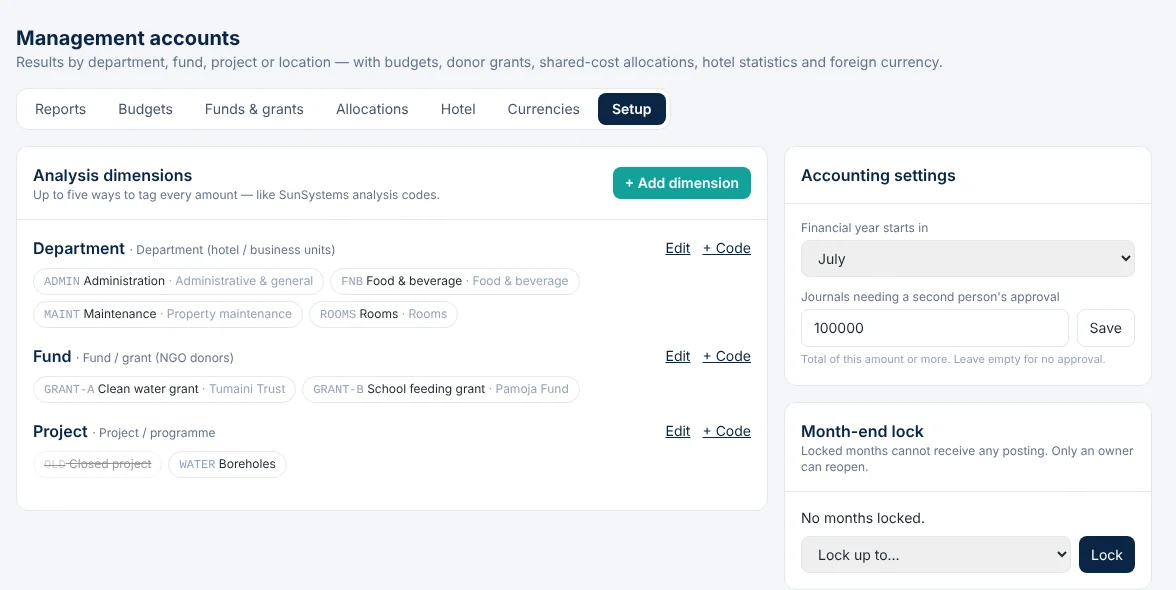
Tag every amount by up to five codes, such as department, fund, project and location, and report by any of them.
Budgets per account and month, budget against actual, and a warning before a cost goes over budget.
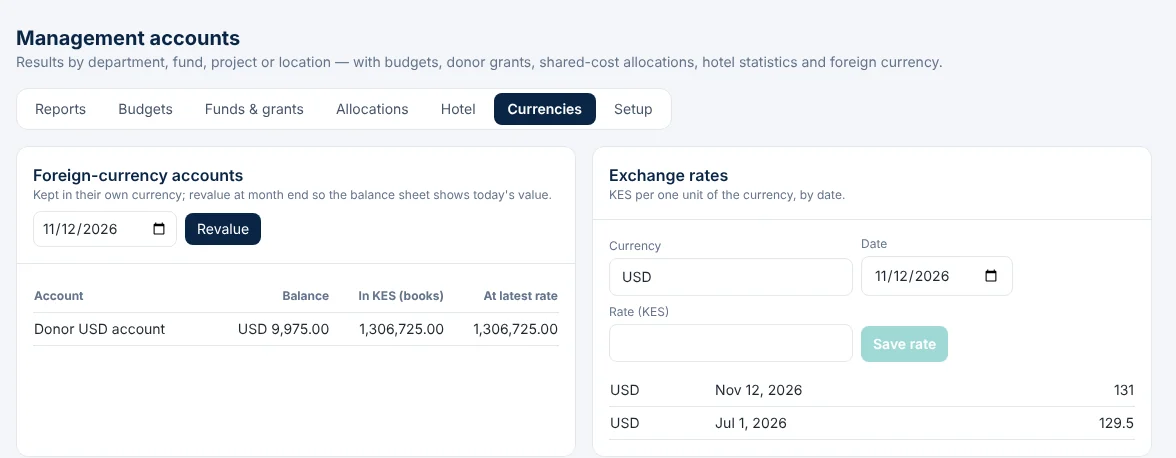
Restricted funds, donor reports, shared-cost allocations, USD accounts and month-end revaluation.
VAT on sales and purchases, KRA eTIMS invoices, and payroll deductions for PAYE, NSSF, SHIF and Housing Levy.
Append-only journals, month-end locks only an owner can reopen, year-end close and a full audit trail.
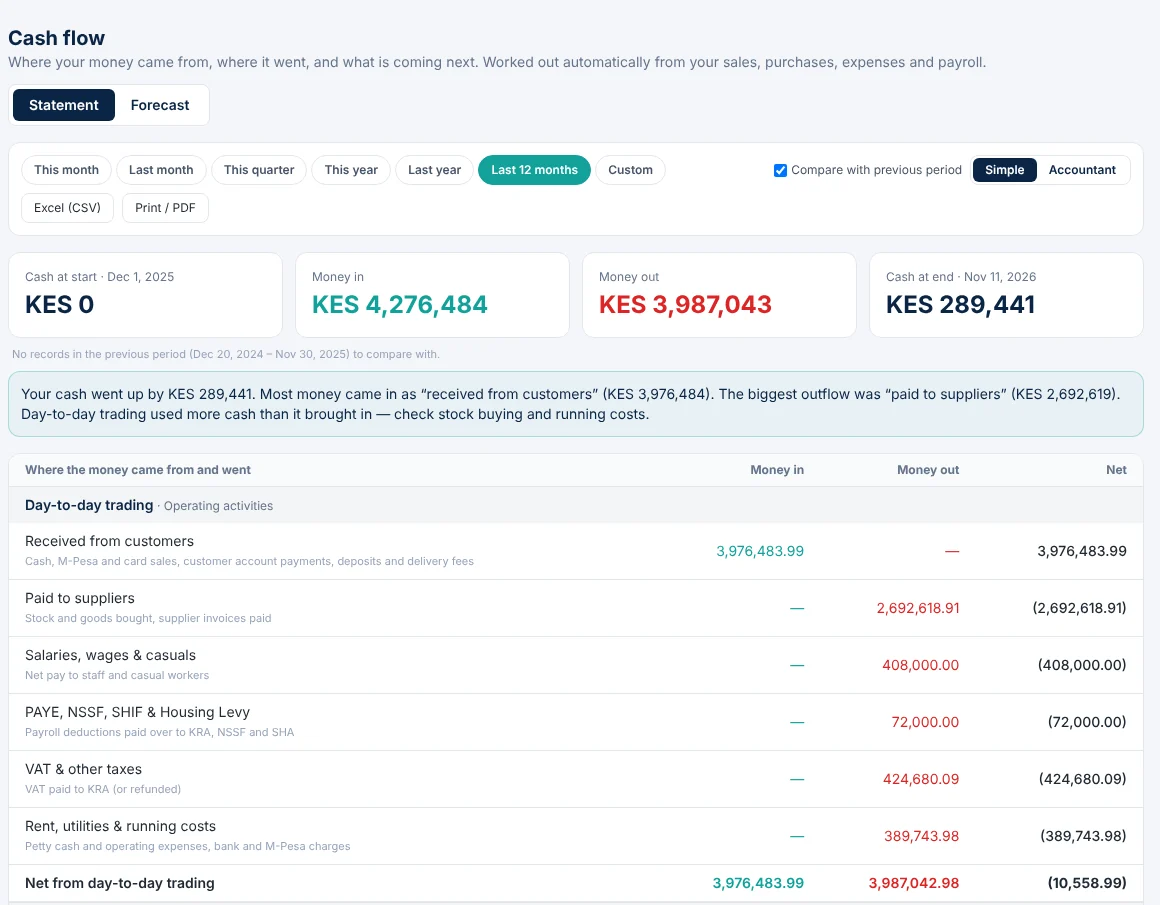
Statement of cash flows, simple or accountant view, and a 13-week forecast of your lowest cash week.
From the statement download to a reconciled balance, then budgets and donor reports.
Screens from our test company with demo figures.
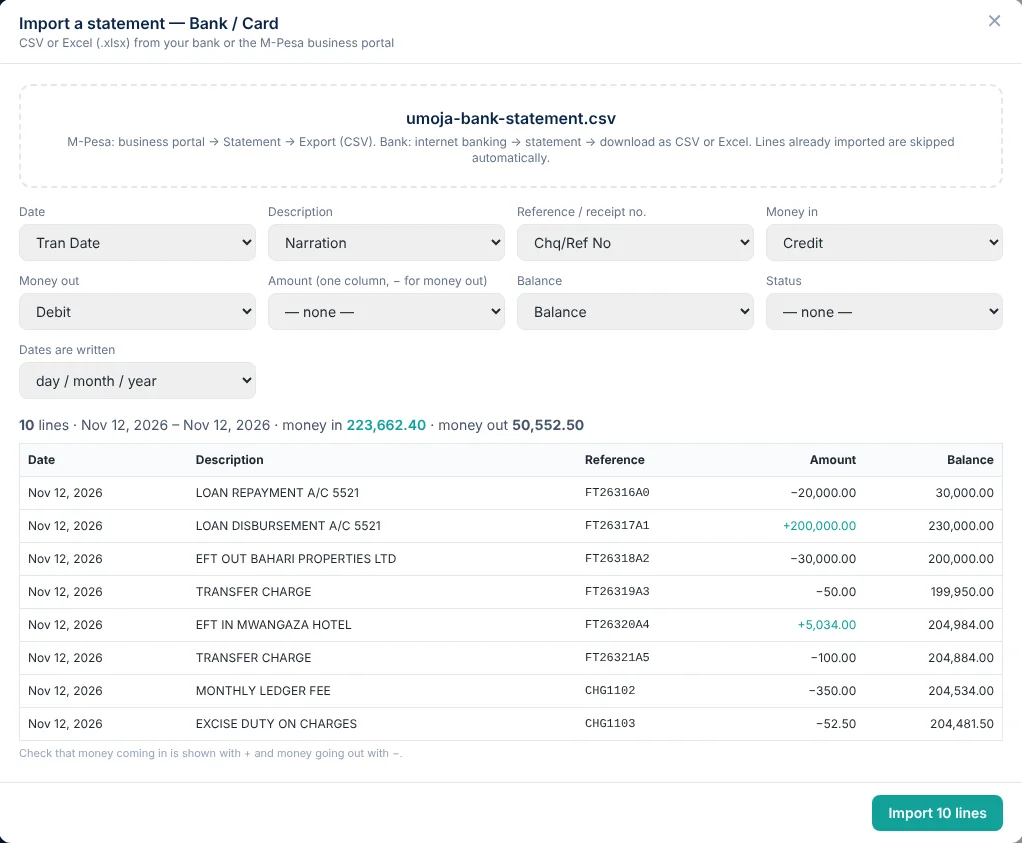
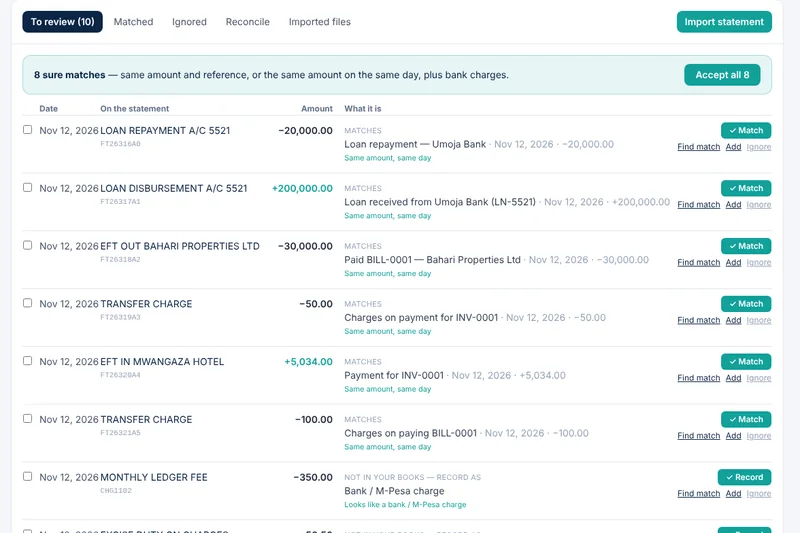
Download the statement as CSV or Excel from internet banking or the M-PESA business portal and drop it in. RetailPulse works out which column is the date, narration, reference, money in, money out and balance, and skips lines you imported before.
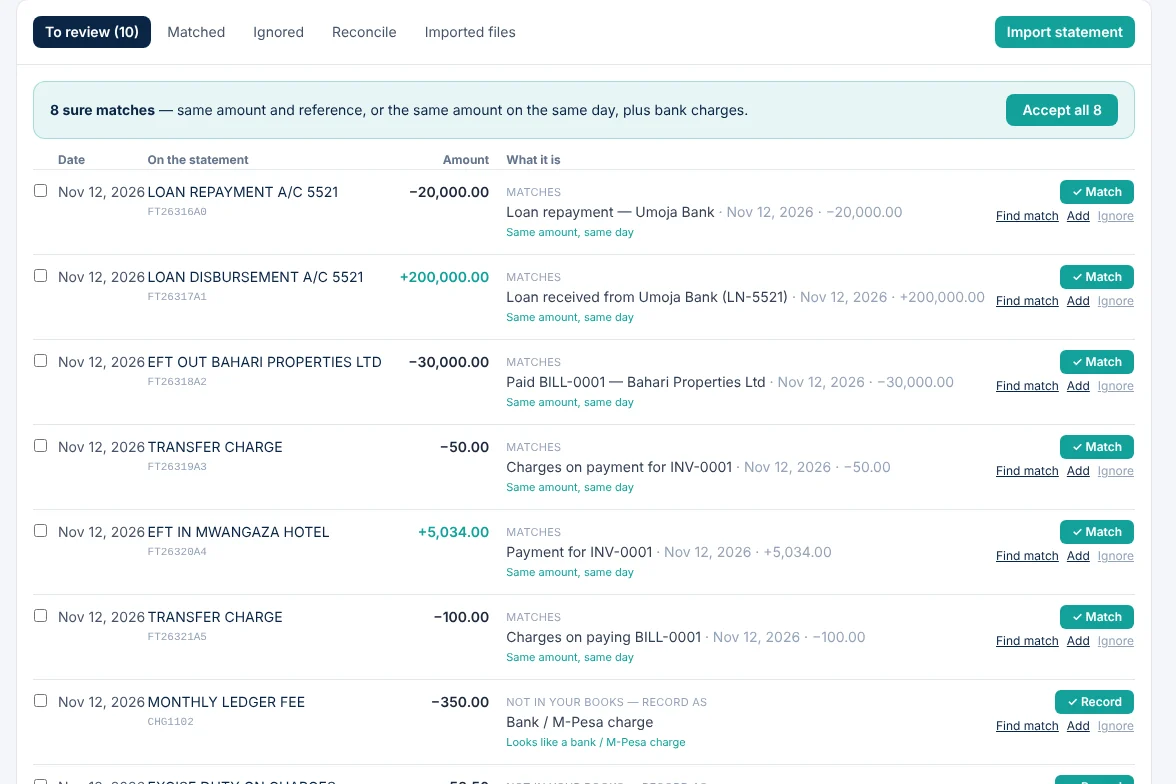
Each statement line is matched to what RetailPulse already recorded: a customer’s payment, a supplier bill paid, a loan repayment, the charge on a transfer. Sure matches, the same amount and reference or the same amount on the same day, can be accepted together. One statement line can match several entries, such as a day’s card settlement.
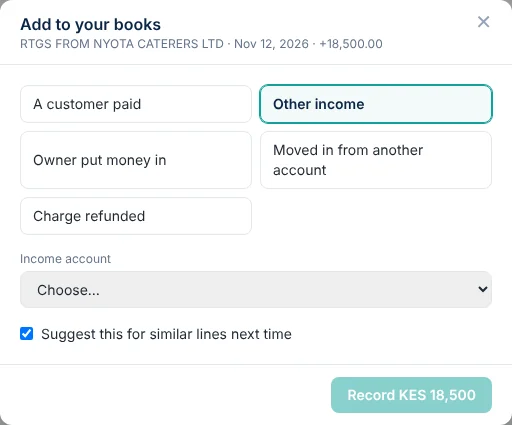
Ledger fees, excise duty on charges, interest and payments nobody recorded are added straight from the statement line: as a customer payment, a supplier payment, an expense, other income, the owner’s money or a transfer. Tick “suggest this for similar lines” and next month’s fees are already labelled.
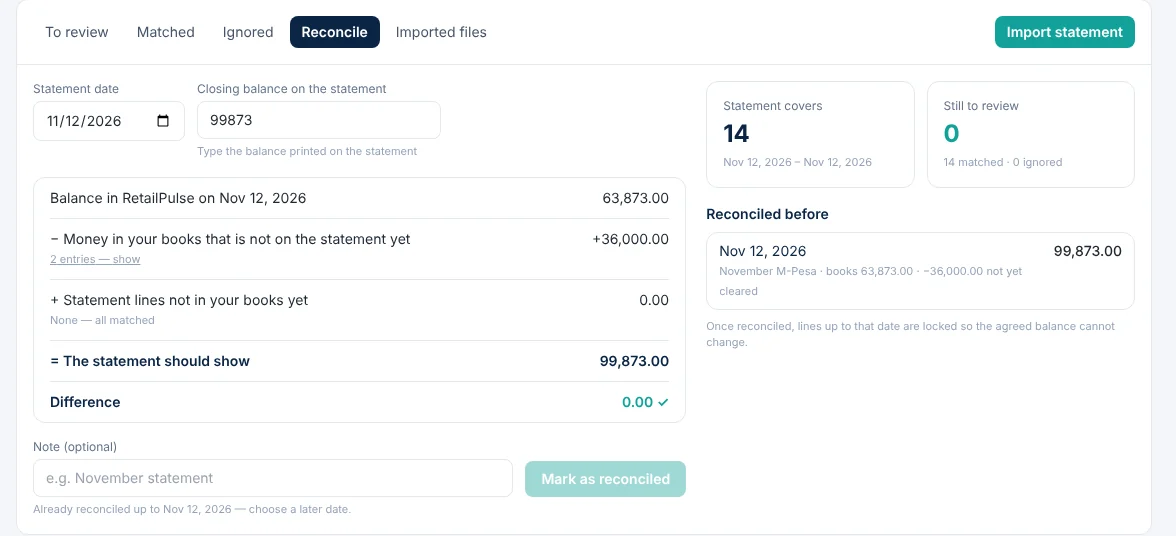
Type the closing balance printed on the statement. RetailPulse explains it from your books: book balance, less money in your books not yet on the statement, plus statement lines not yet in your books. When the difference is zero, mark it reconciled and the lines up to that date are locked.
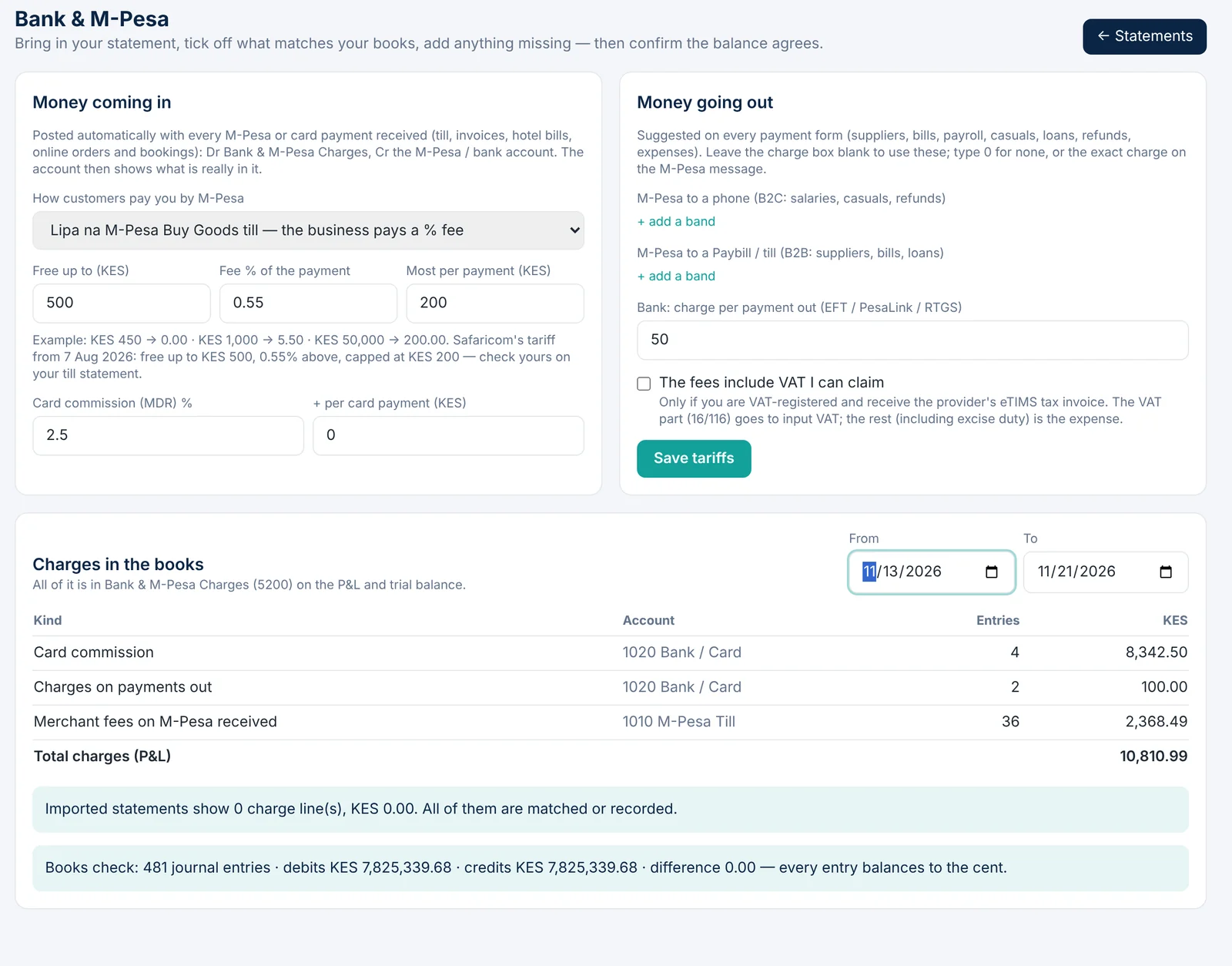
Set the Buy Goods tariff once (free up to KES 500, 0.55% above, capped at KES 200, Safaricom’s rate from 7 August 2026), plus Paybill bands, card commission and the charge on money you send out. Each payment then posts its fee to Bank & M-PESA Charges on the same day, so the P&L and trial balance show what the business really paid. A books check confirms every entry balances to the cent.
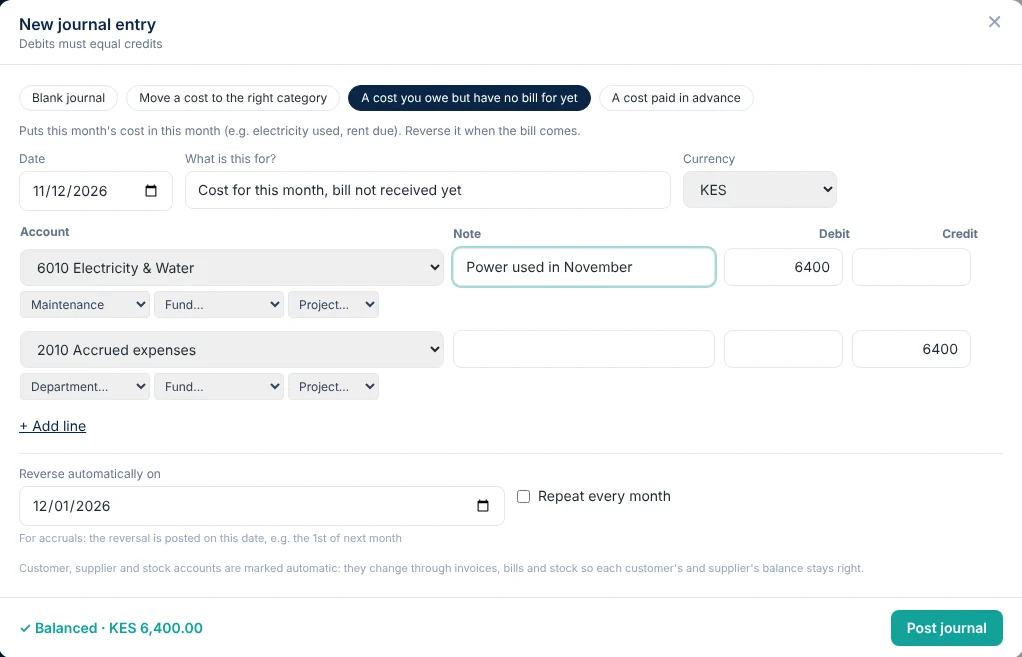
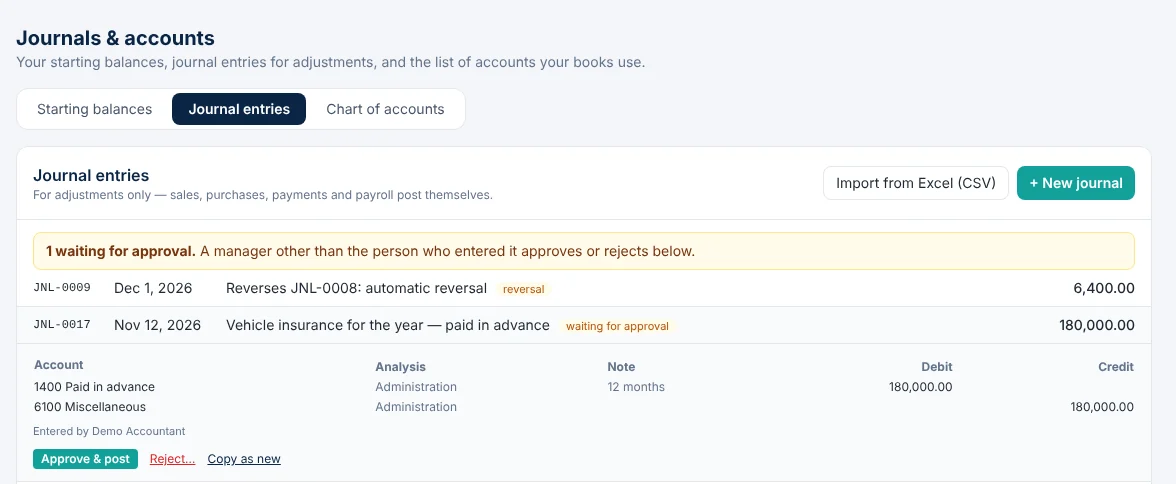
Templates cover the common adjustments: an accrual for a cost you owe but have no bill for yet, a prepayment, moving a cost to the right category, or a blank journal. Accruals reverse automatically on the date you set, and a journal can repeat every month. Every line can carry a department, fund and project.
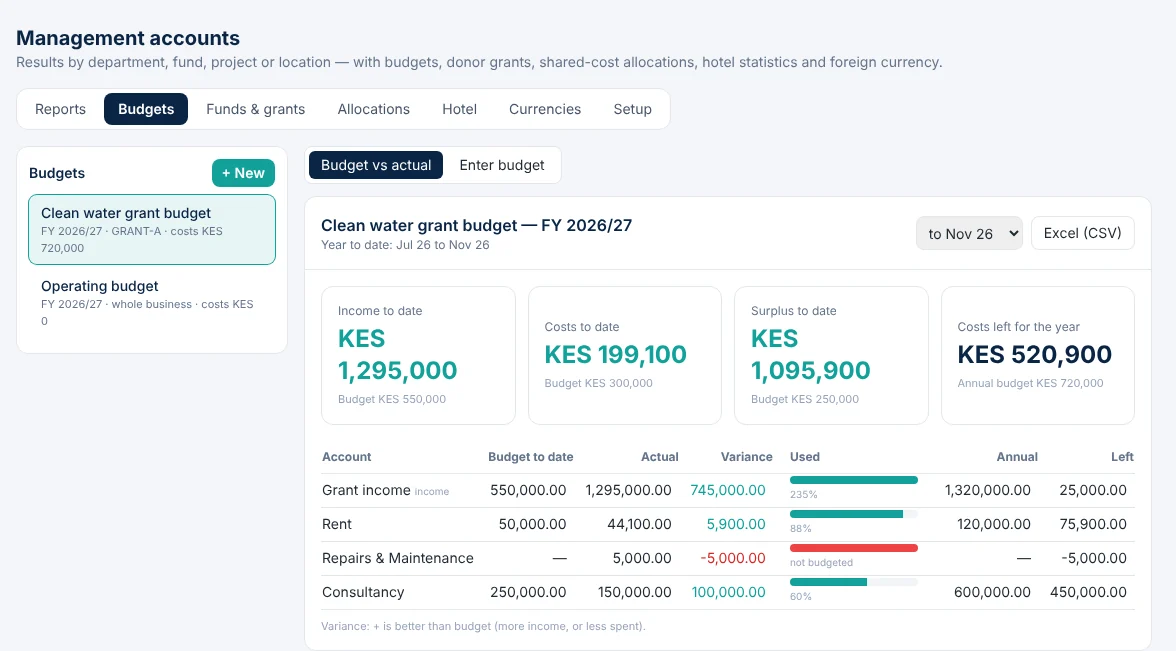
Build a budget per account and month, for the whole business or for one department or grant, starting from last year’s actuals if you like. The report shows budget to date, actual, the variance and how much of the year’s budget is used. When a posting would take a cost over budget, RetailPulse warns before it is saved.
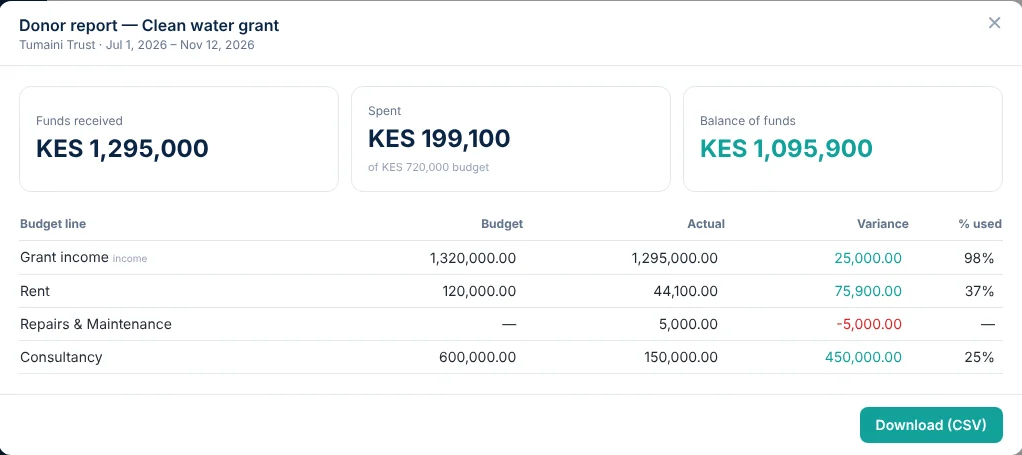
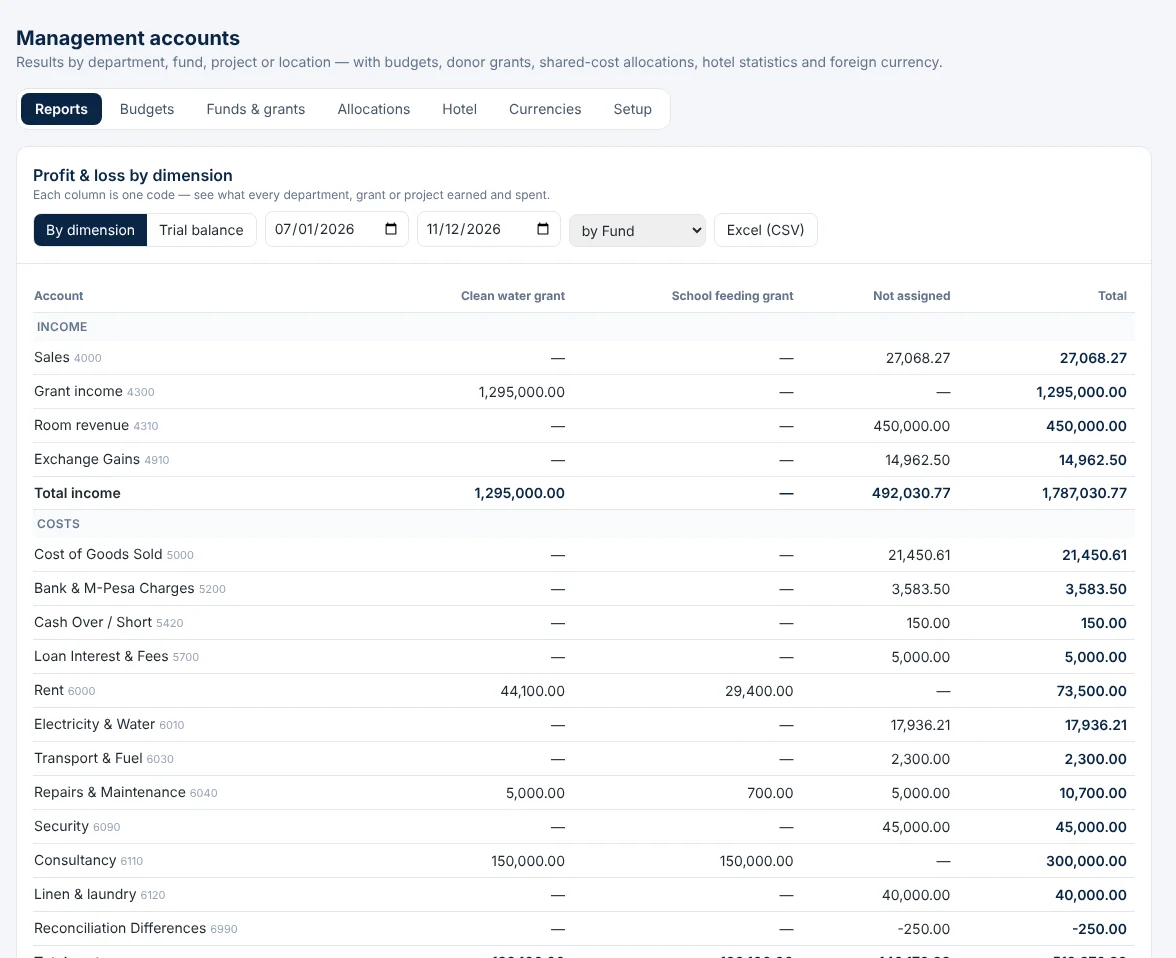
Tag income and costs to a fund or grant and RetailPulse keeps restricted and unrestricted money apart. For each grant you get funds received, spent against budget line by line, and the balance, ready to download for the donor. Shared costs such as rent can be split across grants with allocation rules.


| Task | In RetailPulse |
|---|---|
| Reconcile every bank and M-PESA account | Bank & M-PESA: import, match, reconcile to zero |
| Post accruals and prepayments | Journal templates with automatic reversal |
| Approve large adjustments | Second-person approval above your limit |
| Check budget against actual | Management accounts → Budgets |
| Revalue foreign-currency accounts | Management accounts → Currencies → Revalue |
| File VAT and payroll deductions | VAT and PAYE, NSSF, SHIF and Housing Levy already in their own accounts |
| Lock the month | Month-end lock; only the owner can reopen |
RetailPulse does not connect live to bank systems; you import the statement file instead, which works with any bank that offers CSV or Excel downloads. PDF statements cannot be read yet. If your accountant needs something specific for your audit, ask us during the demo.
The best fit is software that handles the Kenyan parts without extra work: M-PESA, KRA eTIMS, VAT, PAYE, NSSF, SHIF and Housing Levy, and bank reconciliation. RetailPulse does these in the same system that sells, buys and pays, so the books are built from real transactions instead of typed in later.
Yes. Download the statement as CSV or Excel from internet banking or the M-PESA business portal and import it. RetailPulse works out the columns, proposes matches with your books, lets you add bank charges and other missing lines, and shows the reconciliation until the difference is zero. PDF statements cannot be read yet.
No. There is no live bank feed. You import the statement file, which works with any Kenyan bank that lets you download CSV or Excel, and lines already imported are skipped automatically.
Yes. Tag every amount by fund or grant, project and department, set a budget per grant, and download a donor report showing funds received, spent and the balance per budget line. Restricted and unrestricted funds are reported separately.
You decide. Set an amount above which a journal needs a second person’s approval. Journals are never edited or deleted; a wrong one is reversed. You can also lock finished months so nothing more can be posted to them.
Yes. Foreign-currency accounts are kept in their own currency with exchange rates by date, and a month-end revaluation posts the exchange gain or loss so the balance sheet shows today’s value.
Accounting is part of every RetailPulse plan, from KES 2,500 a month billed yearly with a one-time setup from KES 25,000. There are no per-user fees. Hardware, internet and third-party fees such as bank and M-PESA charges are the customer’s own costs.
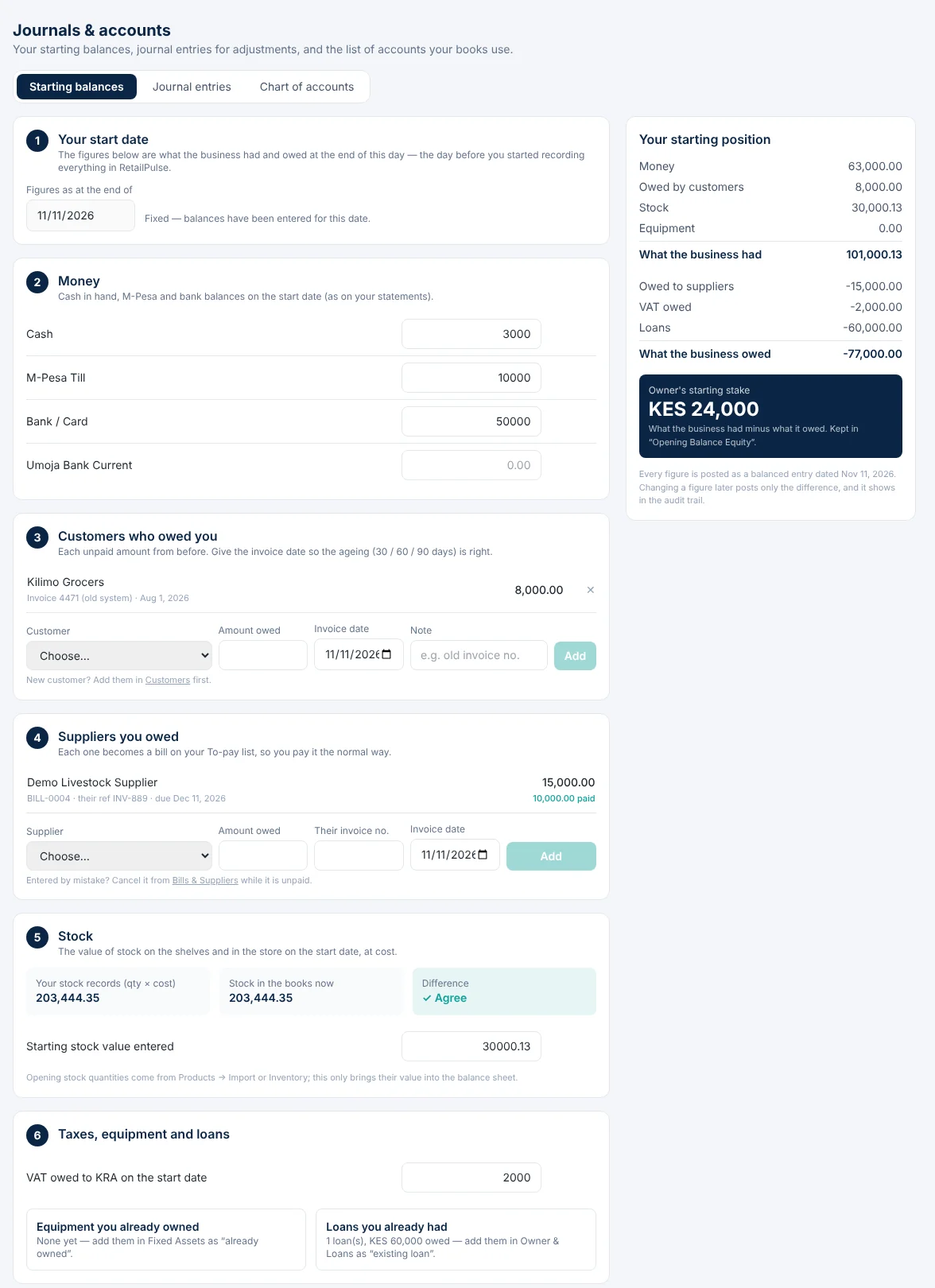
Use the starting balances screen: money in each account, what customers owed (with invoice dates, so ageing is right), what you owed suppliers, stock value, VAT owed and existing loans. RetailPulse posts them as balanced opening entries and shows your starting position.
Yes. Set the tariffs once: the Lipa na M-PESA Buy Goods rule (free up to KES 500, 0.55% above, capped at KES 200, Safaricom’s tariff from 7 August 2026, all editable), Paybill bands, card commission and charges on money sent out. Every M-PESA or card payment received, at the till, on an invoice, on a hotel folio or from the online shop, then posts its fee to Bank & M-PESA Charges the same day, and statement charge lines match without being counted twice.
We will import a sample bank and M-PESA statement, reconcile it with you and show the management accounts on our demo company.